Administration Guide
Silver Bullet 3.0 is a desktop app for one person on their own computer. You are the administrator of your own copy: nobody else signs in, and every setting in this guide is yours to change. This guide covers the admin area: connecting databases and loading files, the data dictionary and its rules, your corrections and verified answers, the brief’s schedules, the AI model, Activity & trust, health and logs, the licence, backups, and the limits on each thing.
Installing Silver Bullet, its settings and the supported computers are in the Installation Guide. Asking questions, answers and boards are in the User Guide. How corrections teach Silver Bullet is explained in full in How Silver Bullet learns. Error codes are in the Troubleshooting Guide.
The admin area
Open it with Admin in the chat header. The left menu (Admin menu on a phone, behind the menu button) has:
| Menu item | What it is for |
|---|---|
| Data sources | Add databases and files, see their status, replace a file, edit or delete a source. |
| Data dictionary | Name and describe columns, add business measures and rules, publish them. |
| Your corrections | Every “No, fix it” you tap. Pick a fix, run the safety check, make it a verified answer or dismiss it. A count shows how many are waiting. |
| AI model | Where the model runs, its settings and API keys, the embedding model, voice input. |
| Health and logs | Each source’s health and refresh schedule, recent errors, problems with a button that fixes each, backups (Back up now, Restore), Send to support and the environment report. |
| Components | The program’s third-party components and their known vulnerabilities. |
| Licence | The trial or licence, this computer’s code, and where you enter a licence key. |
| Network and firewall | Every connection Silver Bullet makes, for your network team. |
| Activity & trust | Every question you asked and every request sent to an AI model. |
| Back to chat | Returns to the chat. |
Silver Bullet signs you in by itself and can only be reached from this computer. There is no sample data in the program: you add your own files or databases.
Search settings, in the header of the admin pages, finds a page, a setting or a data source by a few letters of its name, for example licence, voice, backup, schedule or a source’s name. Each word typed must start a word of the name (or of the page it is on). Pick a result with the mouse or a tap, or with the ↓ / ↑ keys and Enter: it opens the page and scrolls to that part of it. Esc closes the list. On a phone the box sits under the page title, full width.
Data sources and plugins
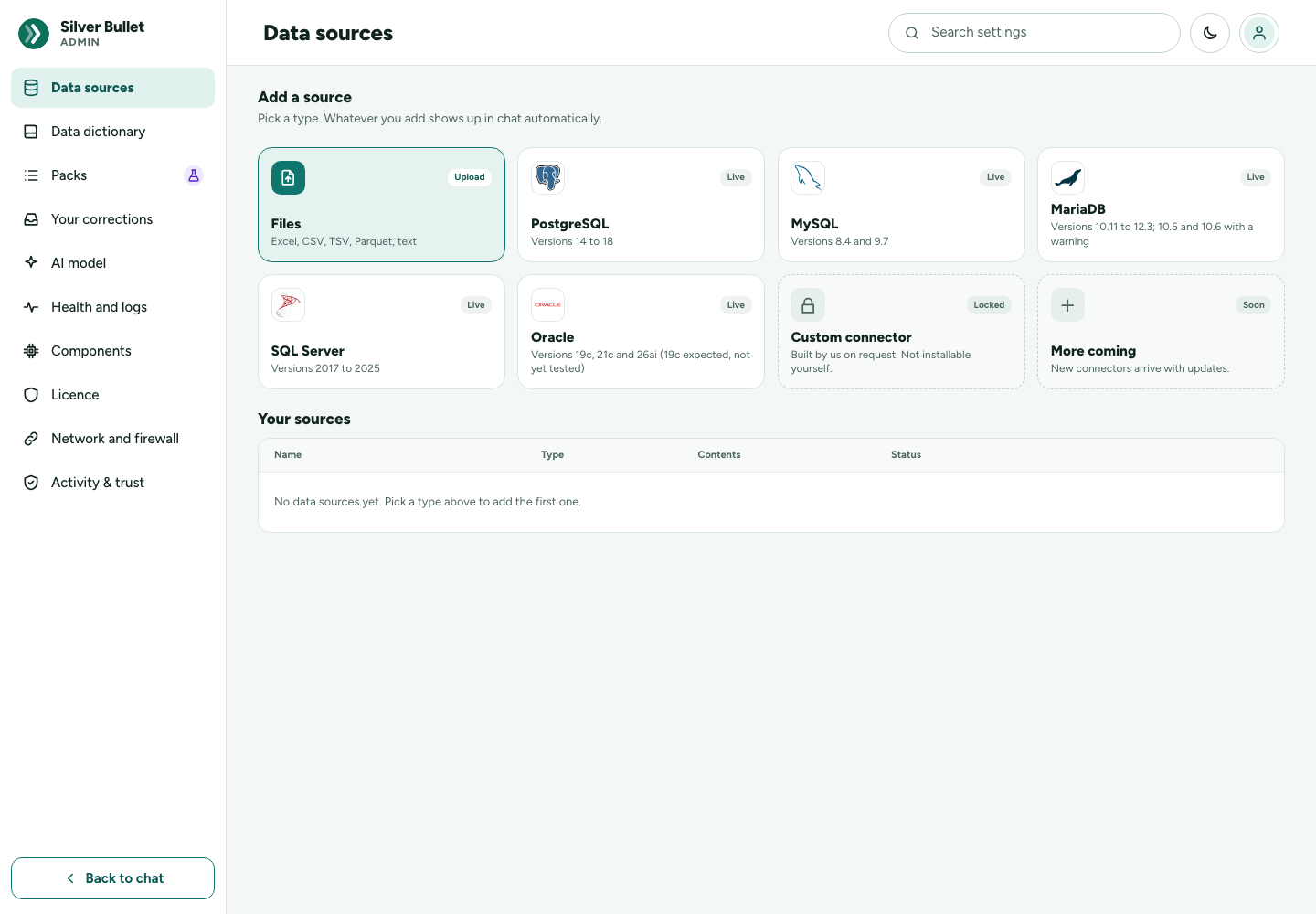
Admin → Data sources has two parts: Add a source (the gallery) and Your sources (the table).
The gallery
Every kind of data source is a plugin. One licence includes every plugin.
| Card | Badge | What it does |
|---|---|---|
| Files | Upload | Excel, CSV, TSV, Parquet, text. Loads a copy into Silver Bullet; your original file is not changed. Opens the file import (below). |
| PostgreSQL | Live | Questions are asked of the database where it is, through a read-only account. |
| MySQL | Live | As above. |
| MariaDB | Live | As above. |
| SQL Server | Live | As above, with Windows, Kerberos and Microsoft Entra ID sign-ins. |
| Oracle | Live | As above. No Oracle client software is needed. |
| Custom connector | Locked | Built by us on request. Not installable yourself. |
| More coming | Soon | New connectors arrive with updates. |
Under each database’s name the card says which versions it supports, for example Versions 14 to 18. Point at a card to see Tested versions: each release with its standing: Tested, Tested — works with a warning or Expected to work — not yet tested. Point at a release with a warning to read the advice. The full table of versions is in the Installation Guide.
Live databases are never copied into Silver Bullet. Files are loaded into Silver Bullet’s own store on this computer. A Snowflake plugin, and questions that combine two sources, come in a later release.
Your sources
| Column | What it shows |
|---|---|
| Name | The name you see in chat, and below it the file name or server. |
| Type | The plugin, for example Files (Excel) or PostgreSQL. |
| Contents | Tables and columns for a database (18 tables · 161 columns), rows and columns for a file (1,021 rows · 14 columns). |
| Status | Healthy, checked 2 min ago, Updated today (a file), Not tested yet, Failing — … with the reason, or Switched off. |
Each row has Edit, and a file source also Replace file.
Switching a source off
On the edit page of a source that has been saved, the switch Switched on (you can ask about it) takes a source out of use without deleting anything. While it is off, you cannot ask about it and the table shows Switched off. Switch it on again and press Save source.
Deleting a source
On the edit page, Delete source asks first:
- for a database: You will no longer be able to ask about it. The database itself is not touched.
- for a file: You will no longer be able to ask about it, and the data loaded from the file is removed.
Deleting cannot be undone. To use the data again, add the source again.
Add a database wizard
Press a database card (PostgreSQL, MySQL, MariaDB, SQL Server or Oracle). The wizard has five steps: Pick type, Connect, Choose tables, Name things, Done.
Connect
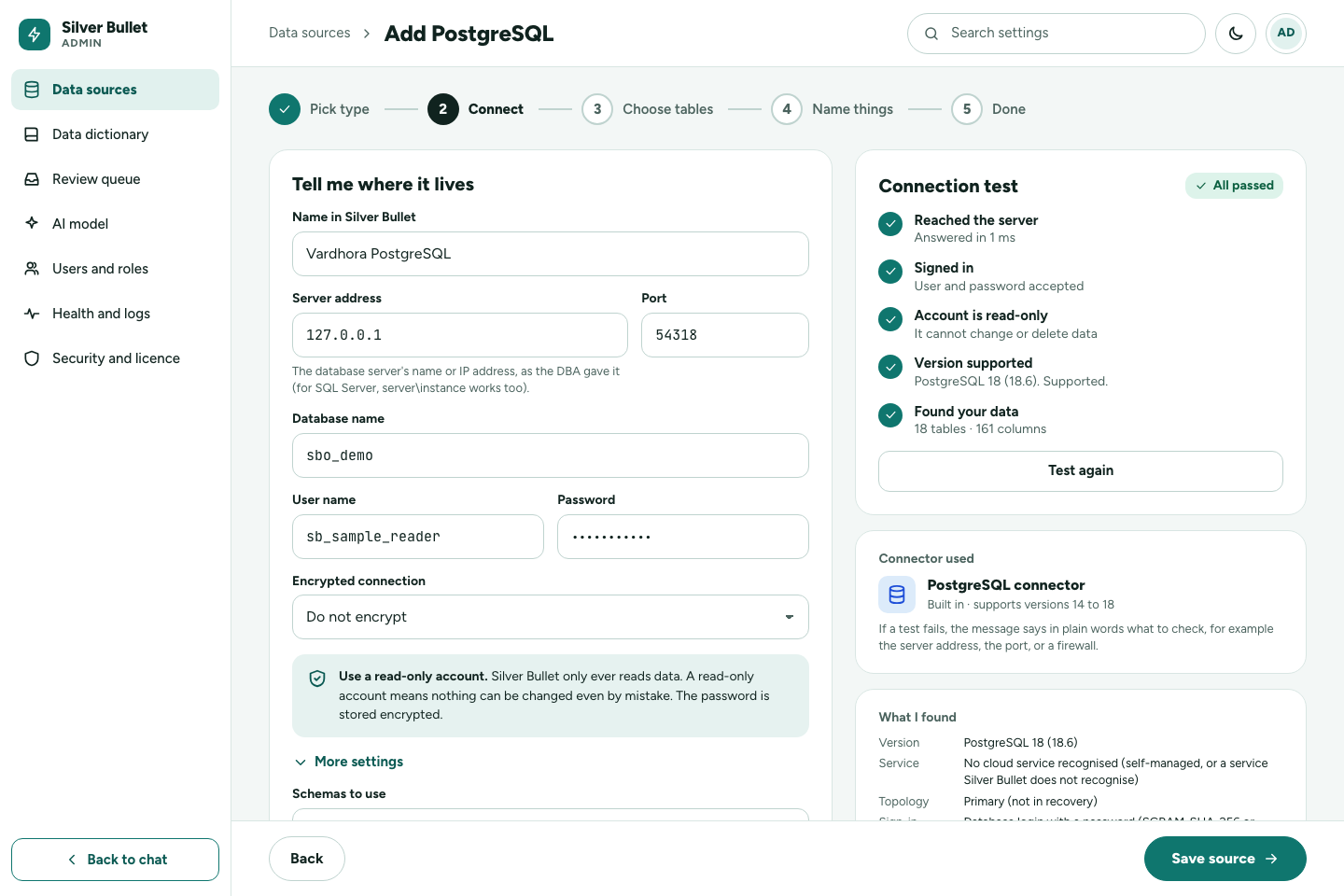
The left card, Tell me where it lives, holds:
- Name in Silver Bullet: what you will see in chat, for example Sales database. Each source needs a name of its own.
- Server address and Port: where the database server is. For SQL Server,
server\instanceworks too. - Database name (Oracle: Service name, SID or connect string).
- The sign-in fields for the chosen sign-in (below).
- Encrypted connection (PostgreSQL, MySQL, MariaDB, SQL Server).
- More settings: schemas, tables, driver parameters and limits (below).
The reminder Use a read-only account stays on the form for a reason: Silver Bullet only ever reads, and a read-only account means nothing can be changed even by mistake. Passwords are stored encrypted on your computer and are never shown again; when you edit a source the password field says Stored — leave blank to keep. If you change the server address, port, database, user name, sign-in method or driver parameters, type the password again (Enter it again: the server or sign-in changed): a stored password is only ever sent to the server it was typed for. Renaming the source or changing which tables it uses or its limits keeps it.
Press Test connection at any time, then Save and test, then choose tables. A new source whose test passes goes on to Choose tables. A source whose test fails is still saved (Saved. The connection test did not pass; it cannot be asked about until it does) and you stay on its edit page to fix it.
The connection test
The Connection test card runs five checks, in order. A check that cannot run because an earlier one failed says Not checked: fix the step above first.
| Check | What it means | When it fails |
|---|---|---|
| Reached the server | Silver Bullet found the server at that address and port. | Check the server address and port, that the server is running, and that no firewall blocks your computer. |
| Signed in | The database accepted the account. | Check the user name and password, or the sign-in method. The database’s own message is shown; the password never is. |
| Account is read-only | The account cannot change or delete data. | The account can change data, and the test names the privileges that allow it. Create an account with read rights only (below), or remove those privileges, then test again. |
| Version supported | The database’s version, and whether it is tested. | A version that is not supported fails, with advice on what to use. A version that works with a warning (for example, past its vendor’s end of support) or is expected to work but not yet tested shows a warning, with advice. |
| Found your data | The tables and columns the account can read (18 tables · 161 columns). | No tables found: check the schemas (Oracle: in upper case) and the grants. |
Each failed or warned check says in plain words what to check. The card at the top says All passed or Needs a fix, and when the test last ran. What I found lists what was recognised: the version, the kind of service (a cloud service, a standby), the sign-in and encryption in use.
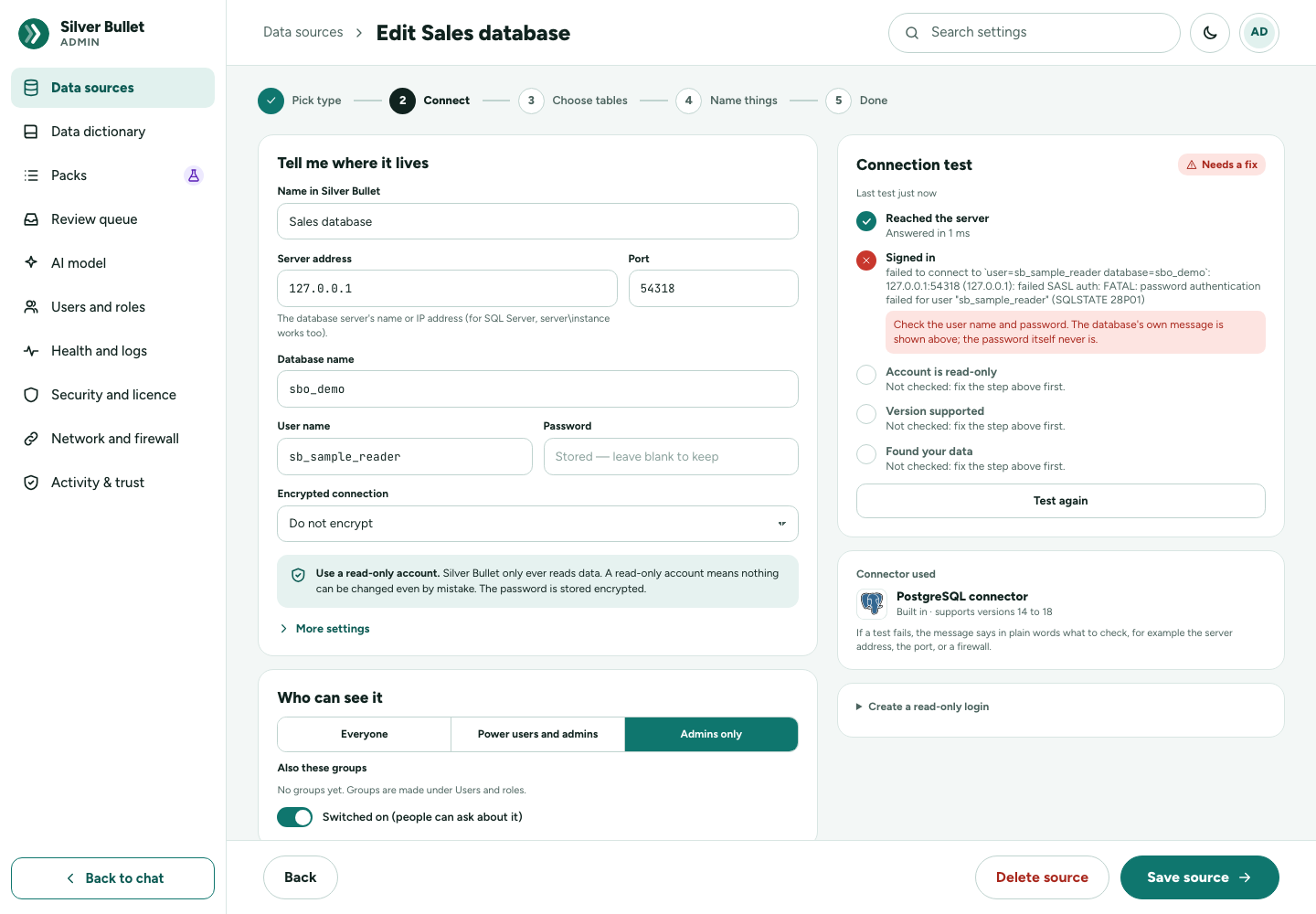
You can ask about a source only after its test has passed. Silver Bullet asks questions only of the tables found by the last successful test.
The read-only account
Create an account that can only read the tables you want to ask about. Each database needs:
| Database | What the login is granted |
|---|---|
| PostgreSQL | A login role with CONNECT on the database, USAGE on the schemas and SELECT on their tables, nothing else, ideally on a hot standby. |
| MySQL, MariaDB | A login with SELECT (and SHOW VIEW if there are views) on the schemas to expose, nothing else. On MariaDB 10.11 and later, nothing that writes granted TO PUBLIC. |
| SQL Server | A login (SQL, Windows or Microsoft Entra) and a database user with SELECT on the schemas and SHOWPLAN, nothing else. |
| Oracle | A user in the pluggable database with CREATE SESSION and READ (or SELECT) on the tables to expose, nothing else, and the PDB’s service name. |
The scripts below are what you (or whoever manages the database) run; the form’s Create a read-only login shows the same script filled in, with Copy SQL and Save as a file. Replace sb_reader, salesdb and
sales with your own login, database and schema names, repeat the schema
lines for every schema, and set a strong password.
PostgreSQL
CREATE ROLE sb_reader LOGIN PASSWORD '…';
GRANT CONNECT ON DATABASE salesdb TO sb_reader;
GRANT USAGE ON SCHEMA sales TO sb_reader;
GRANT SELECT ON ALL TABLES IN SCHEMA sales TO sb_reader;
-- app_owner = the role that creates the tables; without FOR ROLE this
-- covers only tables created by whoever runs it, so new tables stay unreadable
ALTER DEFAULT PRIVILEGES FOR ROLE app_owner IN SCHEMA sales GRANT SELECT ON TABLES TO sb_reader;
Also allow your computer’s address in pg_hba.conf (hostssl … scram-sha-256)
and reload. On PostgreSQL 14, run REVOKE CREATE ON SCHEMA public FROM PUBLIC
(15 and later do this already).
MySQL and MariaDB
CREATE USER 'sb_reader'@'%' IDENTIFIED BY '…';   -- better: '%' = the address of your computer
GRANT SELECT ON sales.* TO 'sb_reader'@'%';
GRANT SHOW VIEW ON sales.* TO 'sb_reader'@'%';   -- only if the schema has views
-- MariaDB 10.11+: anything granted TO PUBLIC applies to this login too
SHOW GRANTS FOR PUBLIC;
On MariaDB 10.11 and later, a write privilege granted TO PUBLIC makes every login able to write, and the test refuses it: revoke it there. Do not create the login with the parsec authentication plugin (MariaDB 11.6 and later).
SQL Server: a SQL Server login
CREATE LOGIN [sb_reader] WITH PASSWORD = '…';
USE salesdb;
CREATE USER [sb_reader] FOR LOGIN [sb_reader];
GRANT SELECT ON SCHEMA::sales TO [sb_reader];
GRANT SHOWPLAN TO [sb_reader];  -- required: every query is compiled first (nothing runs) and checked
SQL Server: a Windows account or group (Windows sign-ins and Kerberos)
CREATE LOGIN [DOMAIN\sb_reader] FROM WINDOWS;   -- or a Windows group: [DOMAIN\SB-Readers]
USE salesdb;
CREATE USER [DOMAIN\sb_reader] FOR LOGIN [DOMAIN\sb_reader];
GRANT SELECT ON SCHEMA::sales TO [DOMAIN\sb_reader];
GRANT SHOWPLAN TO [DOMAIN\sb_reader];
-- A group login gives the rights of EVERY group the account is in: Test connection checks them all.
SQL Server: a Microsoft Entra ID user or application
-- The server (or Managed Instance) needs a Microsoft Entra admin; run this as that admin,
-- connected to the database salesdb itself (Azure SQL Database does not support USE).
CREATE USER [sb_reader] FROM EXTERNAL PROVIDER;
GRANT SELECT ON SCHEMA::sales TO [sb_reader];
GRANT SHOWPLAN TO [sb_reader];
SHOWPLAN is required: without it the test warns and every question is
refused. It shows query plans; it cannot read or change data. Also check that
public has no EXECUTE on procedures and that the login is in no role that
writes.
Oracle
-- Connected to the pluggable database (its service name), not the root:
CREATE USER sb_reader IDENTIFIED BY "…";
GRANT CREATE SESSION TO sb_reader;
GRANT READ ON sales.customers TO sb_reader;   -- one line per table or view (READ, or SELECT)
-- 23ai / 26ai: a whole schema at once
-- GRANT SELECT ANY TABLE ON SCHEMA sales TO sb_reader;
-- Optional: lets the test report whether the database is open read-only
-- GRANT SELECT ON V_$DATABASE TO sb_reader;
Create the user in the pluggable database, not as a C## common user in the
root. Give no roles and no ANY privileges (other than the schema grant shown).
A user that owns tables is refused, because an owner can always change its own
tables. If the user has a profile, SESSIONS_PER_USER must be at least 3.
Wherever there is a read replica or standby, point Silver Bullet at it.
Sign-ins
PostgreSQL, MySQL, MariaDB and Oracle sign in with User name and Password: a database login that can only read.
SQL Server has a Sign in with list. The help under it says what the User name and Password fields hold for the sign-in chosen.
| Sign in with | User name | Password | Notes |
|---|---|---|---|
| SQL Server login | The login name | Its password | The server must accept SQL logins (mixed mode). Many company servers accept Windows sign-in only. |
| This computer’s Windows sign-in | (nothing to type) | (nothing) | Your own Windows account is used. Needs Silver Bullet to run on Windows. Optional Server SPN under More settings (blank: MSSQLSvc/host:port). |
| A Windows account (DOMAIN\user and password) | DOMAIN\user |
Its password | Works from macOS and Linux too, unless the domain has switched NTLM off; then use Kerberos. |
| Kerberos (macOS, Linux) | The principal, user or user@REALM |
The password, or blank to use a ticket from kinit or the Keytab file |
Also krb5.conf (blank: KRB5_CONFIG, else /etc/krb5.conf); under More settings Credential cache, Realm, Server SPN. Use the server’s full DNS name as the server address; the SPN MSSQLSvc/host:port must be registered. On Windows, use one of the two Windows sign-ins instead. |
| Microsoft Entra ID password | The sign-in name ([email protected]) |
Its password | Directory (tenant) ID. Does not work with multifactor sign-in. |
| Microsoft Entra ID, sign in in the browser | An optional sign-in name to suggest | (nothing) | Works with multifactor sign-in. The browser sign-in is not stored: after a restart, press Test connection and sign in again. |
| Microsoft Entra ID service principal | The application (client) ID | A client secret | Directory (tenant) ID; or a Certificate file (instead of a client secret), whose password goes in the password field. Replace the secret before it expires. |
| Azure managed identity | The client ID of a user-assigned identity (blank: the system-assigned one) | (nothing) | Only when your computer is an Azure virtual machine that has the identity. |
Not tested in this release: the Kerberos and Microsoft Entra ID sign-ins to SQL Server. They are built and carried over from Silver Bullet Suite 2, but have not been tested against a real server for 3.0.0-rc.7. Test the connection, try some questions, and tell support what you find.
Oracle’s Connect by chooses how the third field is read:
| Connect by | What to type in Service name, SID or connect string |
|---|---|
| Service name | The pluggable database’s service name, for example ORCLPDB1. Recommended. |
| SID | A SID. On a multitenant database a SID reaches the container root, which is refused: use the PDB’s service name instead. |
| Connect string or descriptor | An EZConnect string (host:port/service, tcps://…), a (DESCRIPTION=…) descriptor, a tnsnames.ora entry pasted whole, a JDBC URL (jdbc:oracle:thin:@…), or an alias from the uploaded wallet. Leave Server address blank when the string names the server. |
For TLS (TCPS) and Oracle Autonomous Database, upload the Wallet (.zip or
cwallet.sso) the console gives you (kept encrypted), with its Wallet
password under More settings if it has one. Without a wallet, paste the
CA certificate (PEM) for TCPS without a wallet under More settings, and
add SSL=true under Driver parameters. Oracle Native Network Encryption
set to REQUIRED does not work: ask whoever manages the database for a TCPS listener. For Oracle,
always list the schemas, in upper case (SALES, HR).
Oracle 19c is expected to work but has not been tested on a real 19c server in this release.
The full table of sign-ins, ways of connecting and encryption options, with how well each is tested:
| Database | Kind | What | Status | Evidence and advice |
|---|---|---|---|---|
| PostgreSQL | Deployment | Self-managed PostgreSQL (Linux, Windows, containers, VMs) | Tested | Safety tests on the local test bed (Docker, the vendor’s own image), before every release. |
| PostgreSQL | Deployment | Hot standby (physical streaming replica) | Expected to work — not yet tested | Recognised with pg_is_in_recovery() and reported as a standby; the test bed has no standby yet. The recommended place to point Silver Bullet: a long query there cannot slow the primary. If queries are cancelled with “conflict with recovery”, ask whoever manages the database about hot_standby_feedback or max_standby_streaming_delay. |
| PostgreSQL | Deployment | Amazon RDS for PostgreSQL | Expected to work — not yet tested | The same database engine and protocol as the tested versions. Not yet tested on RDS. Use the instance endpoint (or a read replica’s endpoint) as the host and a database password login. |
| PostgreSQL | Deployment | Amazon Aurora PostgreSQL | Expected to work — not yet tested | The same database engine and protocol as the tested versions. Not yet tested on Aurora. Use the cluster’s reader endpoint as the host, so questions go to a replica. |
| PostgreSQL | Deployment | Azure Database for PostgreSQL — Flexible Server | Expected to work — not yet tested | The same database engine and protocol as the tested versions. Not yet tested on Azure. Azure requires TLS: add sslmode=require (or verify-full with the CA file) to the driver parameters. Use a database password login. |
| PostgreSQL | Deployment | Google Cloud SQL for PostgreSQL | Expected to work — not yet tested | The same database engine and protocol as the tested versions. Not yet tested on Cloud SQL. Connect to the instance’s IP address (or through the Cloud SQL Auth Proxy running beside Silver Bullet) with a database password login. |
| PostgreSQL | Deployment | PostgreSQL-compatible products: Amazon Redshift, Greenplum, CockroachDB, YugabyteDB and others | Not supported | They speak PostgreSQL’s protocol but differ in the catalog, the query planner and read-only transactions, which the safety checks depend on. Not tested. Not supported. Point Silver Bullet at a real PostgreSQL copy of the data, or ask support. |
| PostgreSQL | Sign-in | Database login with a password (SCRAM-SHA-256 or md5) | Tested | Safety tests on the local test bed (Docker, the vendor’s own image), before every release. |
| PostgreSQL | Sign-in | Client certificate (sslcert and sslkey driver parameters) | Expected to work — not yet tested | Passed to the driver (pgx) as-is; not tested. The files must be readable by the account Silver Bullet runs as. |
| PostgreSQL | Sign-in | AWS IAM or Microsoft Entra ID access tokens | Not supported | A connection keeps a fixed password; these tokens expire after 15 to 60 minutes and Silver Bullet does not renew them. Create a database login with a password for Silver Bullet. |
| PostgreSQL | Encryption | TLS when the server offers it, certificate not checked (sslmode=prefer, the default) | Expected to work — not yet tested | The driver’s standard behaviour; the test bed’s servers do not offer TLS, so only the unencrypted fallback is tested. Set sslmode=require to refuse an unencrypted connection, or verify-full to also check the certificate. |
| PostgreSQL | Encryption | TLS with the server’s certificate checked (sslmode=verify-full, sslrootcert= |
Expected to work — not yet tested | The driver’s standard option; not tested. |
| PostgreSQL | Encryption | No TLS (the server does not offer it) | Tested — works with a warning | Safety tests on the local test bed (Docker, the vendor’s own image), before every release. Works, but anyone on the network path could read the traffic. Ask whoever manages the database to turn on ssl, then set sslmode=require. |
| MySQL / MariaDB | Deployment | Self-managed MySQL | Tested | Safety tests on the local test bed (Docker, the vendor’s own image), before every release. |
| MySQL / MariaDB | Deployment | Self-managed MariaDB | Tested | Safety tests on the local test bed (Docker, the vendor’s own image), before every release. |
| MySQL / MariaDB | Deployment | MariaDB asynchronous replica | Tested | Detection tested on MariaDB 11.8. The recommended place to point Silver Bullet. |
| MySQL / MariaDB | Deployment | MySQL replica | Expected to work — not yet tested | Recognised from an active replication channel or read_only; the test bed has no MySQL replica yet. The recommended place to point Silver Bullet. |
| MySQL / MariaDB | Deployment | MariaDB Galera Cluster node | Tested — works with a warning | Tested on a single-node cluster. Every Galera node accepts writes, so a node is not a read replica: a long query competes with the application’s writes there. Point the connection at an asynchronous replica of the cluster, or a node kept out of the application’s load balancer. |
| MySQL / MariaDB | Deployment | Amazon Aurora MySQL | Expected to work — not yet tested | The same database engine and protocol as the tested versions. Not yet tested on Aurora. Use the cluster’s reader endpoint as the host. |
| MySQL / MariaDB | Deployment | Amazon RDS for MySQL | Expected to work — not yet tested | The same database engine and protocol as the tested versions. Not yet tested on RDS. Use the endpoint of a read replica where there is one. |
| MySQL / MariaDB | Deployment | Amazon RDS for MariaDB | Expected to work — not yet tested | The same database engine and protocol as the tested versions. Not yet tested on RDS. Use the endpoint of a read replica where there is one. |
| MySQL / MariaDB | Deployment | Azure Database for MySQL — Flexible Server | Expected to work — not yet tested | The same database engine and protocol as the tested versions. Not yet tested on Azure. Azure requires TLS: the default tls=preferred encrypts; set tls=true to also check the certificate. |
| MySQL / MariaDB | Deployment | Percona Server for MySQL | Expected to work — not yet tested | The same database engine and protocol as the tested versions. Not yet tested. |
| MySQL / MariaDB | Sign-in | Password login (caching_sha2_password, mysql_native_password, MariaDB’s normal password) | Tested | Safety tests on the local test bed (Docker, the vendor’s own image), before every release. |
| MySQL / MariaDB | Sign-in | MariaDB ed25519 authentication | Expected to work — not yet tested | Supported by the driver; not in the test bed. |
| MySQL / MariaDB | Sign-in | MariaDB parsec authentication (11.6 and later) | Not supported | The driver cannot sign in with it. Create the login with a normal password or ed25519. |
| MySQL / MariaDB | Sign-in | AWS IAM or Microsoft Entra ID access tokens | Not supported | A connection keeps a fixed password; these tokens expire and Silver Bullet does not renew them. Create a login with a password for Silver Bullet. |
| MySQL / MariaDB | Encryption | TLS when the server offers it, certificate not checked (tls=preferred, the default) | Tested | MySQL 8.4 and 9.7 on the local test bed offer TLS with their own certificate, and the default encrypts. MariaDB 11.4 and later offer TLS by default with a self-signed certificate: tls=preferred encrypts without checking it. Set tls=true to also check the certificate (it must be issued by a CA this machine trusts). |
| MySQL / MariaDB | Encryption | TLS with the certificate checked (tls=true) | Expected to work — not yet tested | The driver’s standard option; not tested with a CA-issued certificate. A self-signed certificate (MariaDB’s default) fails the check. Needs a certificate issued by a CA this machine trusts. |
| MySQL / MariaDB | Encryption | No TLS (the server does not offer it, or tls=false) | Tested — works with a warning | Safety tests on the local test bed (Docker, the vendor’s own image), before every release. Works, but anyone on the network path could read the traffic. Ask whoever manages the database to enable TLS on the server. |
| MySQL / MariaDB | Also checked | MariaDB grants TO PUBLIC (10.11 and later) are checked as the login’s own | Tested | Tested on MariaDB 11.8 on the local test bed, before every release, and on 10.11 and 11.4 (packaging/mariadb-bed.sh, 8 Oct 2026). |
| MySQL / MariaDB | Also checked | Roles the login holds count even when they are not its default role | Tested | Tested on MariaDB 10.5, 10.11, 11.4 and 11.8. |
| SQL Server | Deployment | SQL Server on Windows or Linux (on premises or in a VM), any edition | Tested | Linux containers 2017 to 2025 on the local test bed; SQL Server 2022 Express on a real Windows machine (last 30 Sep 2026). |
| SQL Server | Deployment | Always On availability group — readable secondary through the listener | Expected to work — not yet tested | Silver Bullet sets ApplicationIntent=ReadOnly, which read-only routing sends to a secondary, and says whether it reached the primary or a secondary; the test bed has no availability group. Connect to the listener. If the test says it reached the PRIMARY, ask whoever manages the database to configure read-only routing. |
| SQL Server | Deployment | Availability group — primary replica | Tested — works with a warning | Works like a standalone server. Queries run on the primary. Ask whoever manages the database to configure read-only routing on the listener so ApplicationIntent=ReadOnly reaches a secondary. |
| SQL Server | Deployment | Azure SQL Database | Expected to work — not yet tested | The same database engine and protocol as the tested versions. Not yet tested (no Azure tenant in the test bed). Open risk: some of the privilege check’s server-level queries may behave differently there — if they do, Test connection refuses the login, which is safe. Host: yourserver.database.windows.net; sign in with Microsoft Entra ID or a SQL login; the database’s own name. Tell support what the test says. |
| SQL Server | Deployment | Azure SQL Managed Instance | Expected to work — not yet tested | The same database engine and protocol as the tested versions. Not yet tested (no Azure tenant in the test bed). Host: the instance’s host name; port 1433 (or 3342 for the public endpoint). |
| SQL Server | Deployment | Amazon RDS for SQL Server | Expected to work — not yet tested | The same database engine and protocol as the tested versions. Not yet tested on RDS. Use the instance endpoint and a SQL Server login. |
| SQL Server | Sign-in | SQL Server login (user name and password) | Tested | SQL Server 2017 to 2025, Linux containers. Many company servers accept Windows sign-in only (“Windows Authentication mode”); then choose a Windows option. |
| SQL Server | Sign-in | This computer’s Windows sign-in (SSPI; Silver Bullet on Windows only) | Tested | SQL Server 2022 Express on a real Windows machine (last 30 Sep 2026), including from Silver Bullet running as a Windows service. On the desktop it is the person’s own account; as a service it is the service’s account — use a dedicated domain account or a gMSA, not Local System. |
| SQL Server | Sign-in | Windows account and password (DOMAIN\user) | Tested | SQL Server 2022 Express on a real Windows machine (last 30 Sep 2026): Negotiate from Windows, and the NTLM that macOS and Linux use (driven from a Windows client). From macOS and Linux this is NTLM, which many domains switch off (error 18452): then use Kerberos. |
| SQL Server | Sign-in | Windows group logins (CREATE LOGIN [DOMAIN\group] FROM WINDOWS) | Tested | SQL Server 2022 Express on a real Windows machine (last 30 Sep 2026): the rights the account has through every group are read and judged. |
| SQL Server | Sign-in | Kerberos from macOS or Linux (kinit ticket, keytab or password) | Expected to work — not yet tested | Implemented with the driver’s Kerberos provider; not tested (no domain in the test bed). Needs the server’s full DNS name as Host, the SPN MSSQLSvc/host:port registered (setspn -L), and a krb5.conf. Tickets expire, typically after 10 hours. |
| SQL Server | Sign-in | Microsoft Entra ID — sign in in the browser (desktop edition only) | Expected to work — not yet tested | Implemented with Microsoft’s Azure identity library; not tested (no Entra tenant in the test bed). Works with multifactor sign-in. The browser sign-in comes back after every restart of Silver Bullet. |
| SQL Server | Sign-in | Microsoft Entra ID — service principal (client secret or certificate) | Expected to work — not yet tested | Implemented with Microsoft’s Azure identity library; not tested (no Entra tenant). Client secrets expire: note the date and replace it before then. |
| SQL Server | Sign-in | Microsoft Entra ID — managed identity (Silver Bullet running in Azure) | Expected to work — not yet tested | Implemented with Microsoft’s Azure identity library; not tested (no Entra tenant). Works only on an Azure VM, App Service or container that has the identity. |
| SQL Server | Sign-in | Microsoft Entra ID — user name and password | Expected to work — not yet tested | Implemented with Microsoft’s Azure identity library; not tested (no Entra tenant). Fails where the tenant requires multifactor sign-in (most do, for people), and Microsoft is retiring it: prefer browser sign-in on the desktop or a service principal on a server. |
| SQL Server | Encryption | Encrypted, certificate checked (encrypt=true, TrustServerCertificate=false) | Expected to work — not yet tested | The driver’s standard behaviour; not tested with a CA-issued certificate. |
| SQL Server | Encryption | TDS 8 strict encryption (encrypt=strict; SQL Server 2022 and Azure) | Expected to work — not yet tested | The driver’s standard option; not tested. |
| SQL Server | Encryption | Encrypted, certificate not checked (encrypt=true, TrustServerCertificate=true) | Tested — works with a warning | SQL Server 2022 on the local test bed (its self-signed certificate). Encrypted, but anyone who can impersonate the server could read the traffic. Install a CA-issued certificate on the server and set TrustServerCertificate=false. |
| SQL Server | Encryption | Only the sign-in encrypted (encrypt not set, false or disable) | Tested — works with a warning | Safety tests on the local test bed (Docker, the vendor’s own image), before every release. (the test bed connects this way). Queries and results cross the network unencrypted. Set encrypt=true. |
| Oracle | Deployment | Pluggable database (PDB) of a container database, reached by its service name | Tested | Safety tests on the local test bed (Docker, the vendor’s own image), before every release. Also on 21c XE. |
| Oracle | Deployment | The container root (CDB$ROOT) | Not supported | Refused: no application tables live there. When the login can see them, the refusal lists the PDBs’ service names. Connect with the pluggable database’s service name. |
| Oracle | Deployment | A PDB or database open read-only | Tested | Tested on 21c XE. The cost check is skipped there (EXPLAIN PLAN cannot write its plan); the time limit still applies. |
| Oracle | Deployment | Non-container (non-CDB) database (19c) | Expected to work — not yet tested | The same SQL as a PDB; not tested (21c and later have no non-CDB). |
| Oracle | Deployment | Active Data Guard physical standby | Expected to work — not yet tested | Recognised from DATABASE_ROLE and reported as a standby; the test bed has no standby. The recommended place to point Silver Bullet. The cost check is skipped on a read-only database; the time limit still applies. |
| Oracle | Deployment | Real Application Clusters (RAC) | Expected to work — not yet tested | Standard Oracle Net; not tested (no cluster in the test bed). Connect with the SCAN name and a service, not one node’s address. |
| Oracle | Deployment | Oracle Autonomous Database | Expected to work — not yet tested | Wallet upload, tnsnames aliases and TCPS are tested against local databases; not tested on a real Autonomous Database. Upload the wallet .zip, enter an alias from it such as mydb_high as the service name, and leave Host blank. |
| Oracle | Deployment | Oracle Database Free / Express Edition | Tested | Safety tests on the local test bed (Docker, the vendor’s own image), before every release. Resource-limited, meant for development. |
| Oracle | Connect with | Service name (the PDB’s) | Tested | Safety tests on the local test bed (Docker, the vendor’s own image), before every release. |
| Oracle | Connect with | SID | Tested | Safety tests on the local test bed (Docker, the vendor’s own image), before every release. A SID always reaches the root of a multitenant database, and is then refused: use the PDB’s service name. |
| Oracle | Connect with | EZConnect string (host:port/service, tcps://…) | Tested | Safety tests on the local test bed (Docker, the vendor’s own image), before every release. |
| Oracle | Connect with | Connect descriptor ((DESCRIPTION=…)) | Tested | Safety tests on the local test bed (Docker, the vendor’s own image), before every release. |
| Oracle | Connect with | A tnsnames.ora entry pasted whole | Tested | Safety tests on the local test bed (Docker, the vendor’s own image), before every release. |
| Oracle | Connect with | JDBC URL (jdbc:oracle:thin:@…) | Tested | Safety tests on the local test bed (Docker, the vendor’s own image), before every release. |
| Oracle | Connect with | An alias from an uploaded wallet’s tnsnames.ora | Tested | Safety tests on the local test bed (Docker, the vendor’s own image), before every release. |
| Oracle | Sign-in | Database user and password | Tested | Safety tests on the local test bed (Docker, the vendor’s own image), before every release. |
| Oracle | Sign-in | Proxy user (PROXY CLIENT NAME driver parameter) | Tested | Safety tests on the local test bed (Docker, the vendor’s own image), before every release. The privileges checked are the target login’s. |
| Oracle | Sign-in | Kerberos, RADIUS or operating-system (external) authentication | Not supported | Not offered by Silver Bullet. Create a database user with a password. |
| Oracle | Encryption | TLS (TCPS) with a wallet, including mutual TLS | Tested | Safety tests on the local test bed (Docker, the vendor’s own image), before every release. |
| Oracle | Encryption | TLS (TCPS) without a wallet (the CA certificate, or one this machine trusts) | Tested | Safety tests on the local test bed (Docker, the vendor’s own image), before every release. |
| Oracle | Encryption | TLS (TCPS) with the certificate not checked (SSL VERIFY=false) | Tested — works with a warning | Safety tests on the local test bed (Docker, the vendor’s own image), before every release. Anyone who can impersonate the server could read the traffic: upload the wallet or the CA certificate instead. |
| Oracle | Encryption | Oracle Native Network Encryption (SQLNET.ENCRYPTION_SERVER = REQUESTED or REQUIRED) | Not supported | A limitation of the driver: the server ends the login and Silver Bullet sees only EOF. Ask whoever manages the database for a TCPS (TLS) listener. The server’s default, ACCEPTED, is fine. |
| Oracle | Encryption | Unencrypted TCP | Tested — works with a warning | Safety tests on the local test bed (Docker, the vendor’s own image), before every release. Works, but anyone on the network path could read the traffic: ask whoever manages the database for a TCPS (TLS) listener. |
| Oracle | Also checked | Profile limits (SESSIONS_PER_USER, CPU_PER_CALL) | Tested | Safety tests on the local test bed (Docker, the vendor’s own image), before every release. SESSIONS_PER_USER must be at least Max concurrent + 1 (3 by default). A CPU_PER_CALL stop is reported like the time limit. |
| Oracle | Also checked | AL32UTF8 databases, non-English text | Tested | Safety tests on the local test bed (Docker, the vendor’s own image), before every release. |
| Oracle | Also checked | Single-byte character sets (WE8MSWIN1252 and others) | Expected to work — not yet tested | The driver converts them; not tested. Text outside the character set cannot be stored, so answers show what is stored. |
| Oracle | Also checked | Resource Manager plans | Expected to work — not yet tested | A stopped call is reported like the time limit; not tested. |
| Oracle | Also checked | Session language and formats | Tested | Safety tests on the local test bed (Docker, the vendor’s own image), before every release. Each session is set to English, ISO dates, ‘.’ as the decimal sign and binary comparison, whatever the database’s defaults. |
Encryption
Encrypted connection offers, per database:
| Database | Choices |
|---|---|
| PostgreSQL | Encrypt if the server offers it (default), Always encrypt, Always encrypt and check the server’s certificate, Do not encrypt |
| MySQL, MariaDB | Encrypt if the server offers it (default), Always encrypt, Always encrypt and check the server’s certificate, Do not encrypt |
| SQL Server | Encrypt the sign-in (the driver’s default), Always encrypt, Strict encryption (TDS 8, SQL Server 2022 and Azure), Do not encrypt |
| Oracle | TCPS with a wallet or a CA certificate (above). |
Choose a setting that encrypts whenever the connection crosses a network you
do not control. Checking the server’s certificate needs a certificate this
computer trusts (PostgreSQL: sslrootcert=/path/ca.pem under Driver
parameters). On MariaDB 11.4 and later with its default self-signed
certificate, Always encrypt and check the server’s certificate fails; use
Encrypt if the server offers it, or install a certificate from a
trusted authority.
More settings: schemas, tables and limits
| Setting | Default | What it does |
|---|---|---|
| Schemas to use | the account’s default schema | Comma-separated. |
| Tables to use | every table the account can read | Written for you by the Choose tables step. |
| Driver parameters | (none) | One key=value per line, passed to the driver. Passwords go in the password fields, never here. Sign-in settings come from Sign in with and are refused here. |
| Time limit per query (seconds) | 30 | A question that runs longer is stopped, and the database is told to stop it. |
| Most rows read per query | 5000 | The most rows one answer reads. |
| Most queries at once (1–16) | 2 | How many queries Silver Bullet runs on this database at the same time. A further one waits up to 30 seconds for a free slot, then gets the data source is already running as many queries as allowed (SB3-2005). Agree a higher number with whoever manages the database first: each is one more connection on the database. |
| Refuse a full scan of a table larger than (rows; -1 = off) | 1,000,000 | Before a query runs, the database’s own estimate is checked; a query that would read a larger table end to end is refused and you are asked to narrow the question. |
| Read uncommitted data (no shared locks; totals may include unsaved changes) | off | SQL Server only. Use it only when the test warns that readers can block writers and you cannot point Silver Bullet at a readable secondary. |
Whatever these settings say, Silver Bullet never changes data: a question that asks to change data is refused before anything is sent, and every query passes the safety checks first.
Choose tables
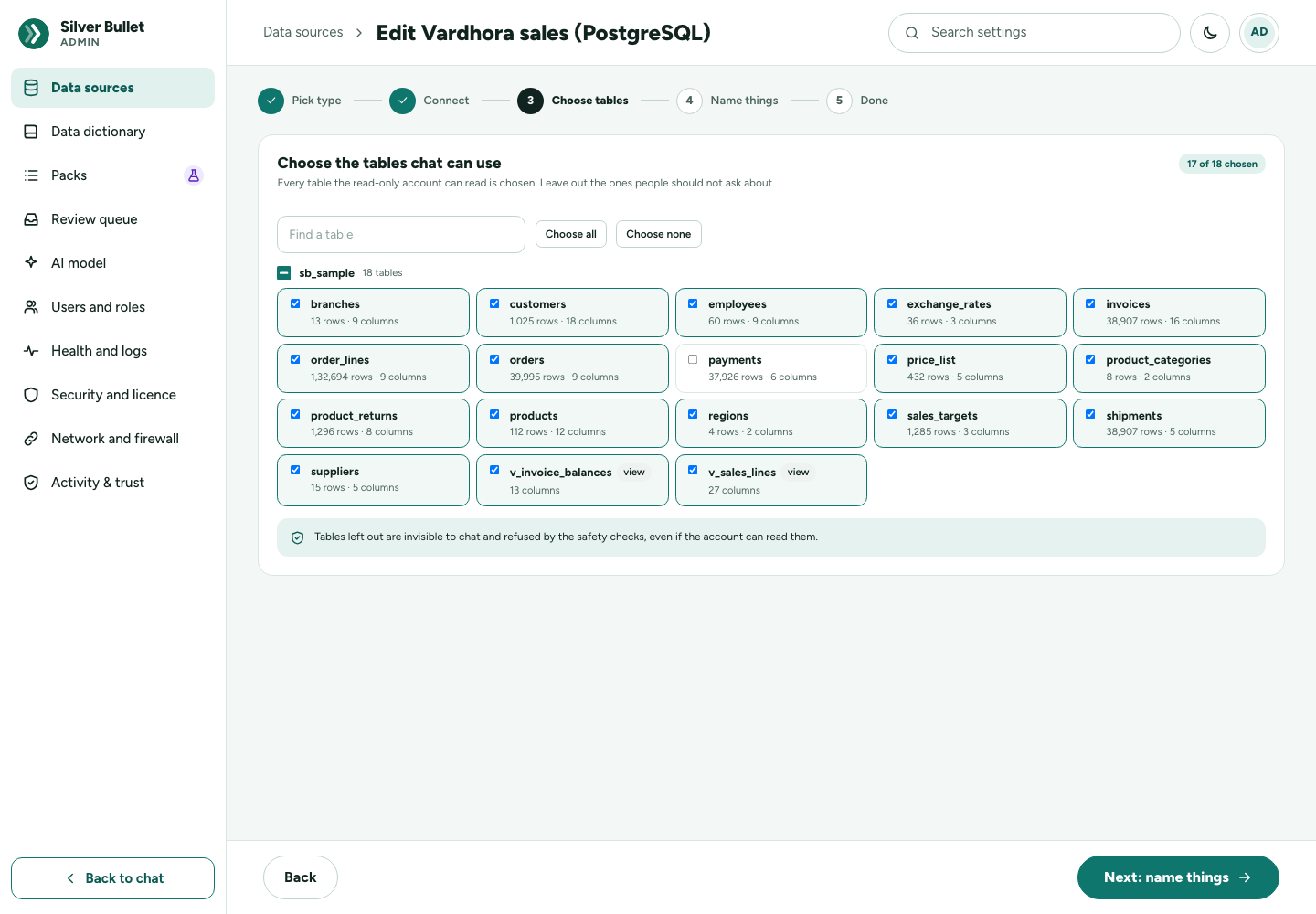
Choose the tables chat can use lists every table and view the account can read, grouped by schema, all chosen. Leave out the ones you do not want to ask about. Find a table, Choose all and Choose none help with long lists. Tables left out are invisible to chat and refused by the safety checks, even if the account can read them.
Next: name things saves the choice and tests the connection again with it.
Name things
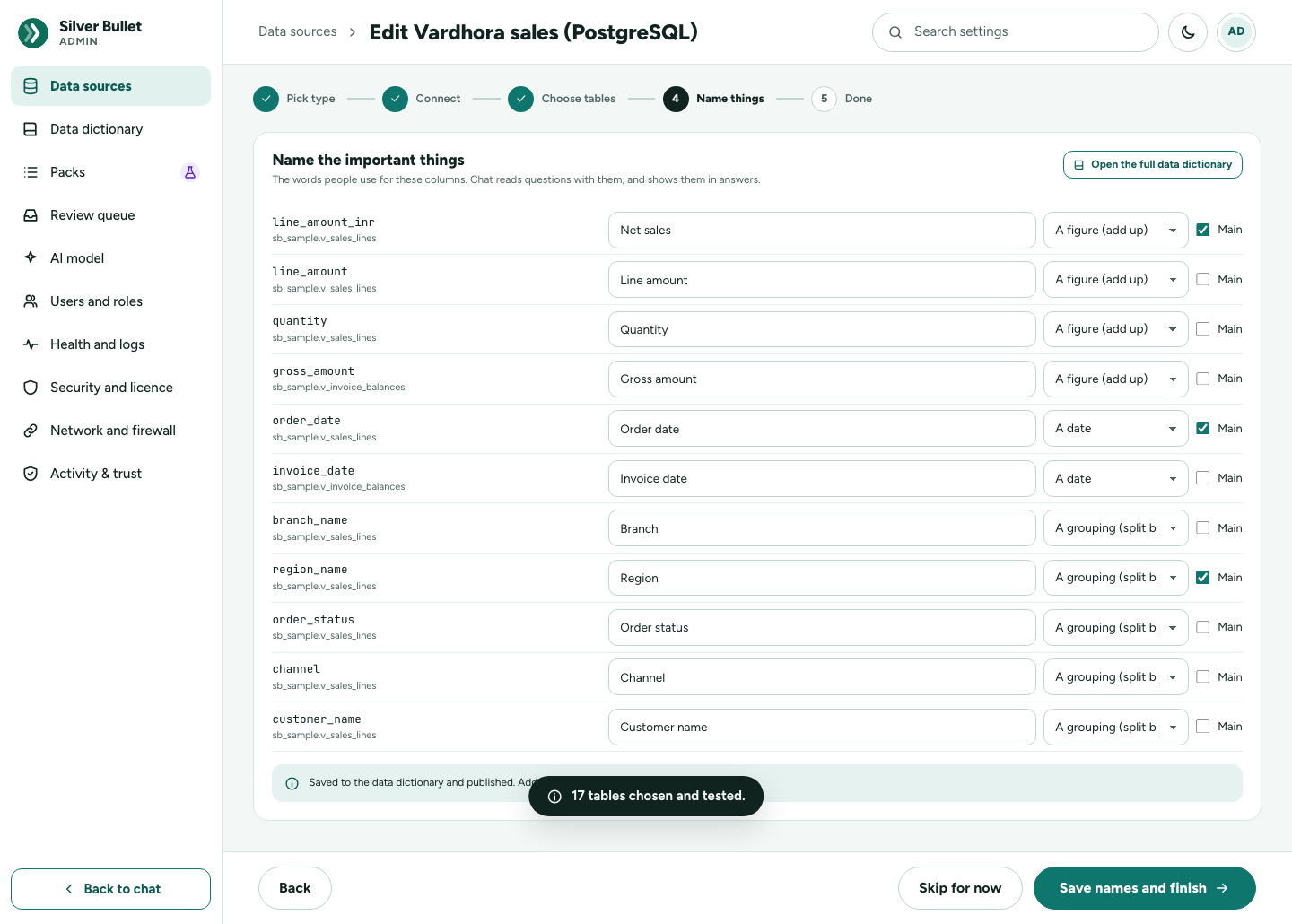
Name the important things suggests the columns worth naming: the figures to add up, the groupings to split by, and the dates. For each, give the Chat name you use, choose What it is (A figure (add up), A grouping (split by), A date, Something else) and tick Main for one main figure, one main grouping and one main date. These make the brief and the home cards.
Save names and finish writes them to the data dictionary and publishes them at once. Skip for now leaves them for later. Open the full data dictionary goes to the dictionary.
Done
Sales database is ready lists the tables chat uses and when its brief and boards are worked out (every day at 06:00 for a new database). You can ask about it now; the brief is worked out in the next few minutes. Ask a question goes to chat, Back to data sources to the list.
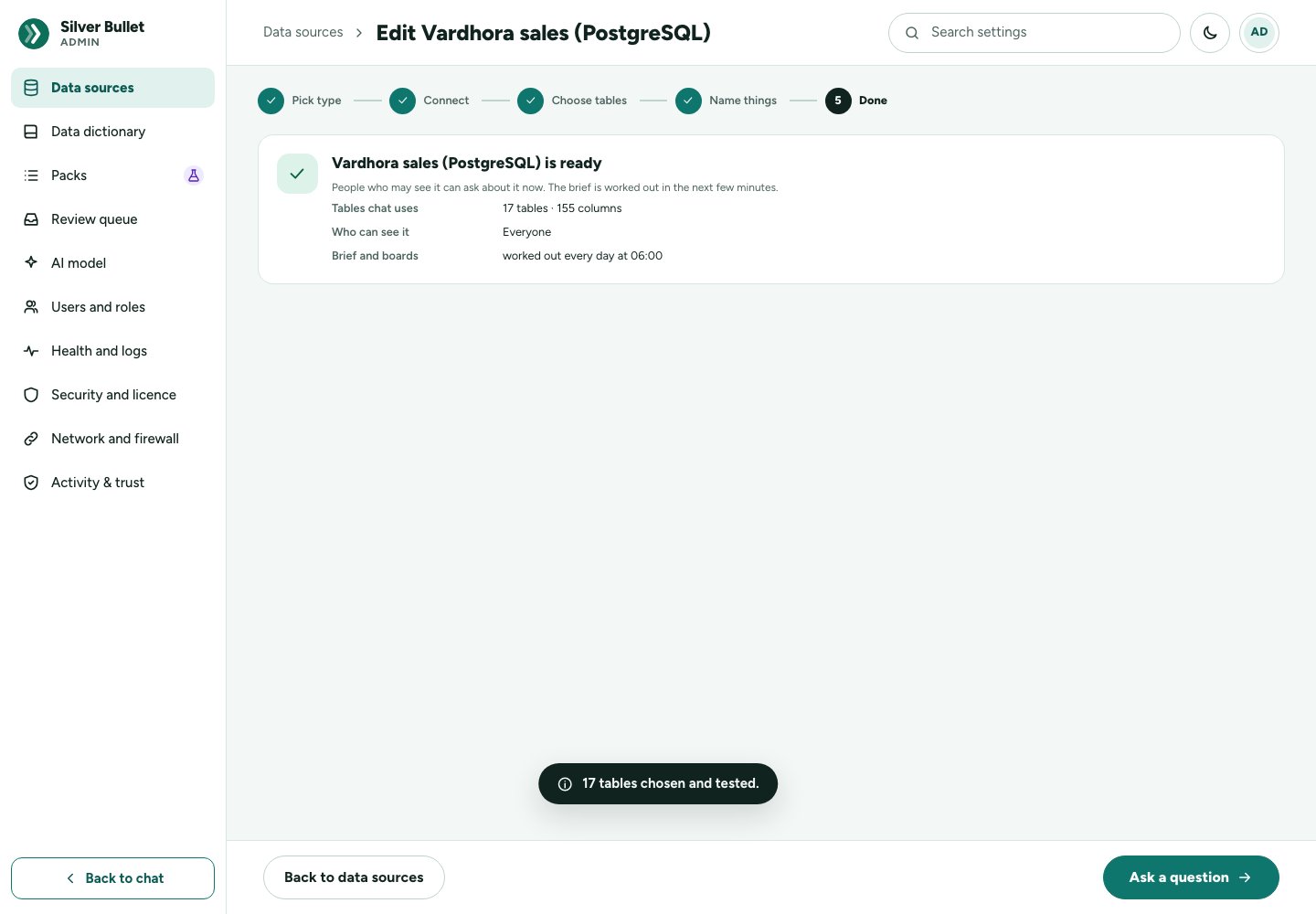
A healthy database’s edit page keeps Choose tables and Name things under What chat can use, so you can come back to them.
File import wizard
Open it from the Files card. It has four steps: Choose files, Check data, Review, Add.
The import is kept as you go: a reload, another tab or a restart takes you back to where you were. An unfinished import is kept for a day after it was last used; the Data sources page then shows A file import is waiting with Continue and Discard.
Choose files
The Add files window: drop files on it, or choose files. Several files can go in one import. Silver Bullet reads the file and keeps a copy ready for questions; your original file is not changed.
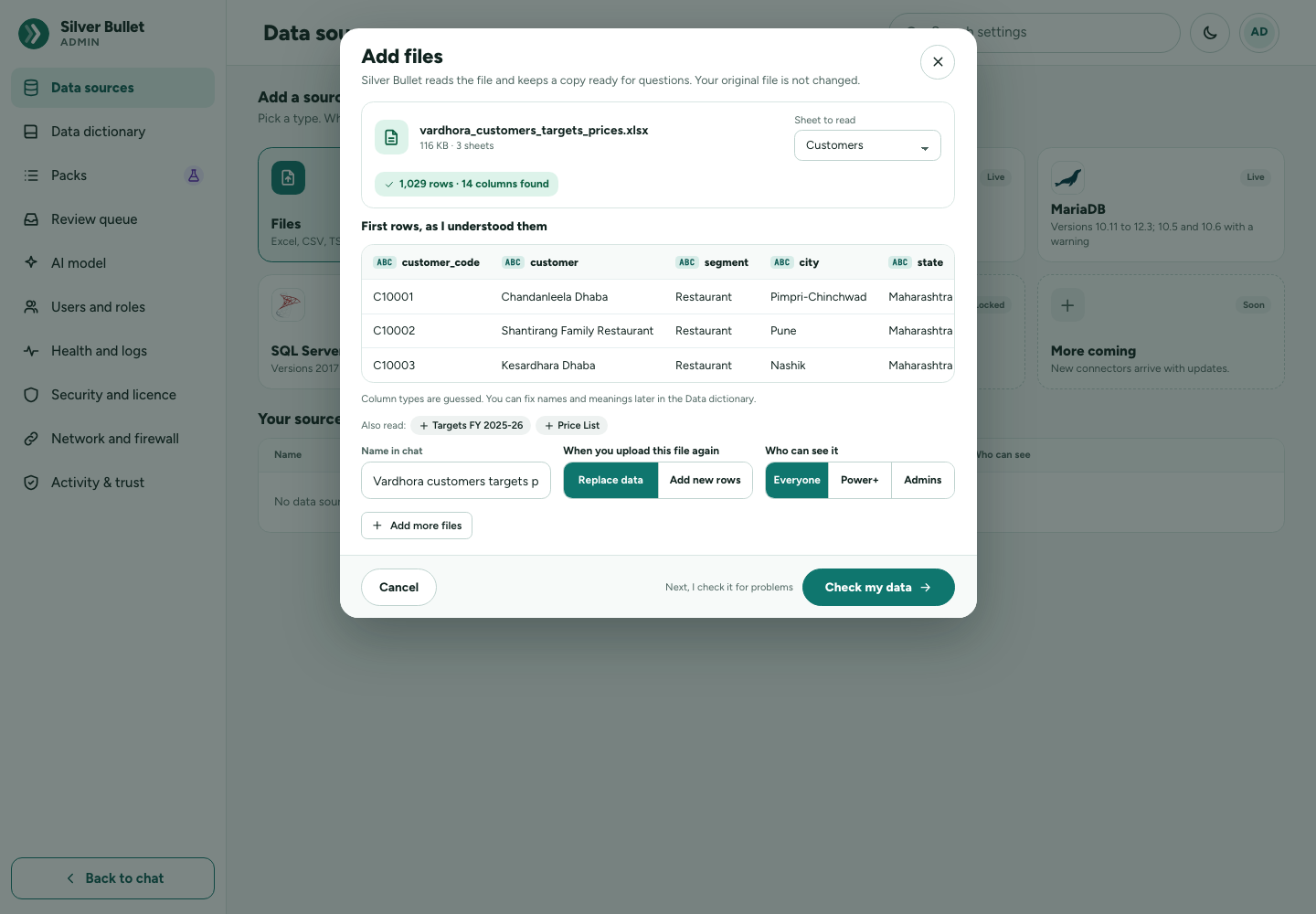
For each file:
- A workbook with several sheets shows Sheet to read. Also read: adds another sheet; each sheet becomes its own data source.
- First rows, as I understood them shows the first rows with the column types guessed. You can fix names and meanings later in the data dictionary.
- Name in chat: the name you will see.
- When you upload this file again: Replace data (next month’s file replaces this one) or Add new rows (each file adds rows).
- Leave this file out removes it from the import.
Then press Check my data.
The formats Silver Bullet reads, and the size limit:
| Format | Extensions | Notes |
|---|---|---|
| Delimited text | .csv, .tsv, .txt |
Delimiter found by itself: comma, semicolon, tab or pipe. A file with any other extension is read as delimited text. |
| Excel | .xlsx, .xlsm, .xltx |
Each sheet is its own dataset. The value Excel last saved for each formula is read. Merged cells: only the top-left cell carries the value. Up to 1,048,576 rows per sheet (Excel’s limit). |
| Excel 97–2003 | .xls |
New in this release candidate: test it with your own files. Up to 65,536 rows per sheet (Excel’s limit). |
| Parquet | .parquet, .pq |
The types the file declares are used (true/false columns load as text). |
- Upload size: 200 MB per file; a larger file is refused (SB3-3010) (
SB_MAX_UPLOAD_BYTES). - An unfinished file import: kept for 24 hours after it was last used, then removed: start again (SB3-3012).
- JSON is not supported. Password-protected workbooks have not been tested: remove the password before loading.
- Several files can be chosen at once; each sheet of a workbook becomes its own data source.
Check data
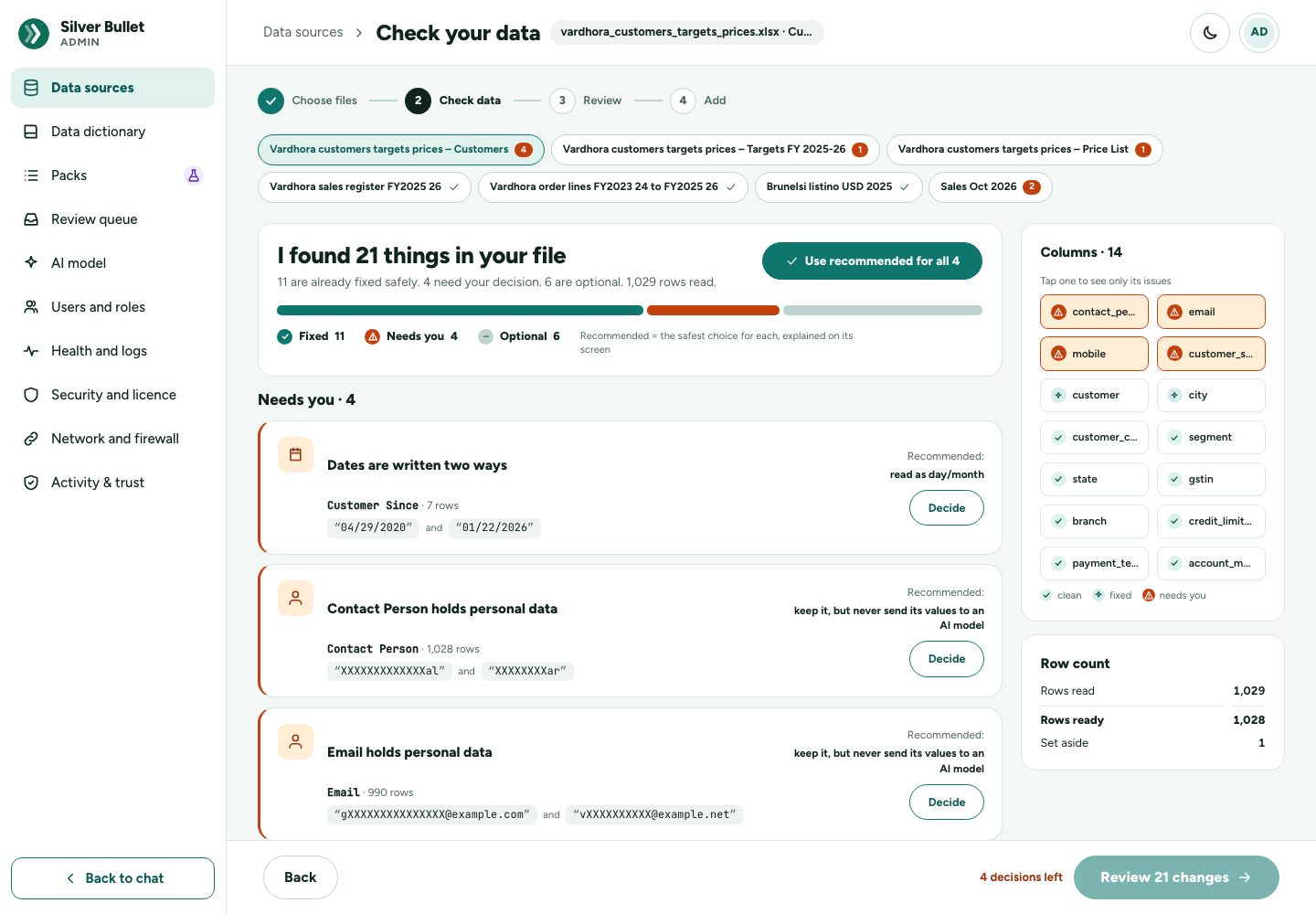
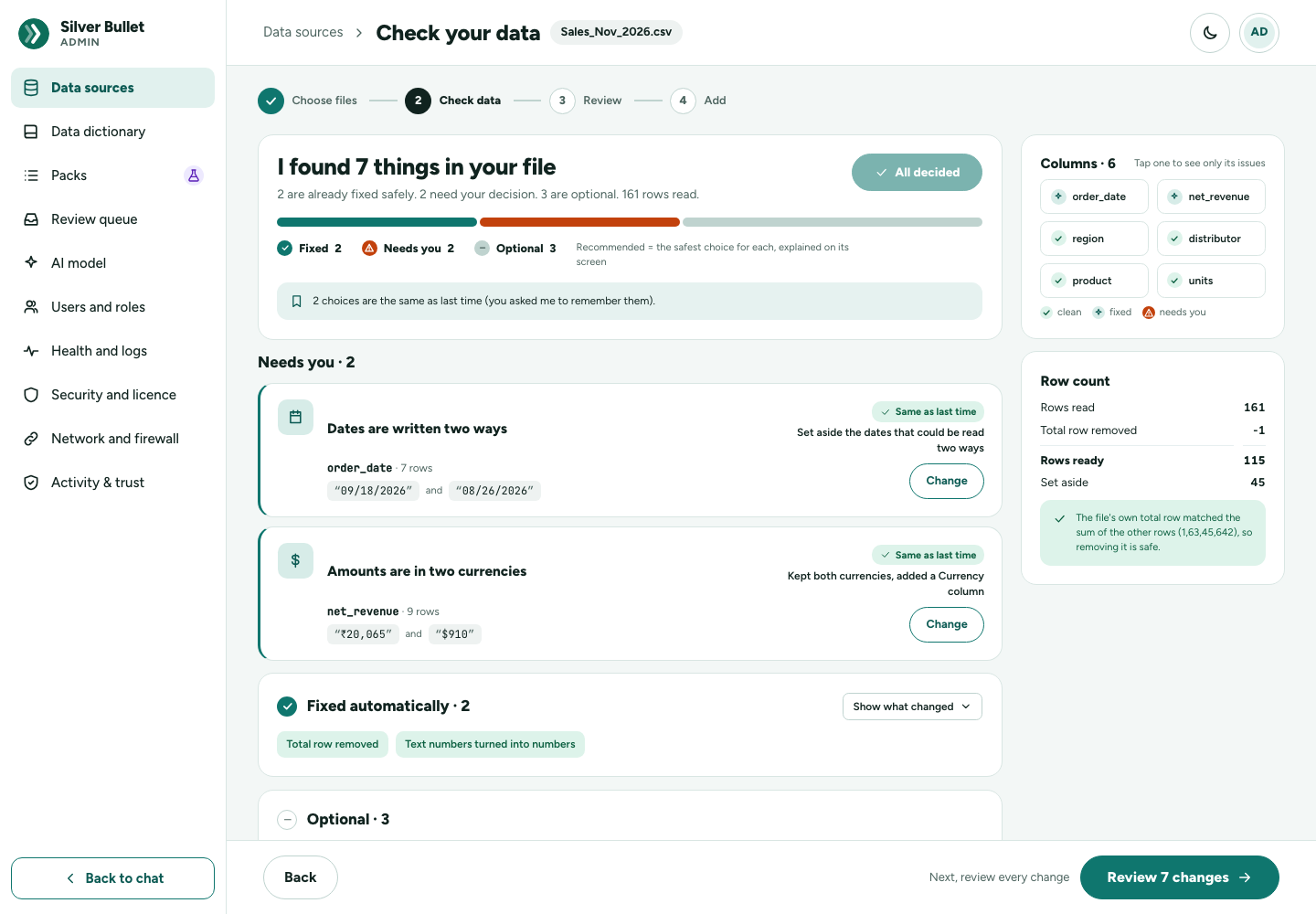
I found N things in your file sorts everything found into three groups:
- Fixed automatically: safe fixes made for you: extra spaces, hidden characters, spellings of the same value, “no value” words, total rows and notes rows, Excel day numbers, leading zeros, decimal commas, amounts written as people type them (₹, Rs., lakhs, /-), a header found below a title. You can look at each and change it.
- Needs you: decisions only you can make (below). The file cannot be added until each is decided.
- Optional: things worth a look that are left as they are unless you decide otherwise: repeated rows, similar names, repeated ids, empty values, future or very old dates, broken patterns.
Use recommended for all takes the recommended choice for every open decision. Recommended is always the safest choice, and each decision screen says why.
Columns is a map of the file: each column is clean, fixed or needs you; tap one to see only its issues. Row count shows the rows read, any total row removed, the rows ready, the rows set aside, and, when periods are turned into rows, the new count. When a total row was removed, it says whether the file’s own total matched the sum of the other rows.
What Silver Bullet works out when it reads a file:
- Encoding: UTF-8, with or without a byte-order mark; otherwise the most likely encoding, guessed from the first 200 KB; when no guess fits the whole file it is read as Windows-1252 and marked (best-effort guess).
- Delimiter: Whichever of comma, semicolon, tab or pipe splits the first lines into the same number of columns.
- Header row: The row among the first 15 that names the columns; rows above it (a title, a letterhead) are dropped.
- Column types: Whole numbers, decimals, dates, true/false or text, guessed from the values (a Parquet file’s own types are used); you confirm or change each before loading.
- Dates: Day first (30/04/2022, 30-04-22, 30-Apr-22), month first (04/30/2022, 04-30-22), year first (2022-04-30) and months (Jun-21, Jun 2021, June 2021: the first of the month). Two-digit years are 2000–2068. Each column is read one way round, decided from the values that can only be read one way; when no value says (no day over 12), you choose, with a recommendation from the file’s other date columns.
- Data health: Blanks, repeated rows, repeated values in an ID, words meaning “no value” (N/A, -), extra spaces, hidden characters, values spelled more than one way, values that are not numbers or dates, dates written in two orders, grand-total rows, time periods as columns, codes that start with 0, postal codes written as numbers (400081.0 is kept as the text 400081), a row counter added by an export (index: 0, 1, 2 …) and columns without a heading (Unnamed: 22) — left out unless you keep them — and personal data (a person’s name by its heading, e-mail addresses, phone numbers and other identifiers). Each comes with fixes to choose from before loading.
- Main measure, date and grouping: Guessed when the file is loaded, so the home cards and the brief work at once: the main measure is the best money column (amount, sales, revenue, gross, net, value, total — never an ID, a postal code, a rate or a percentage; a quantity is the second measure), the date the transaction date, the main grouping a column with 2 to 50 values covering most rows (a category, state, region, status or channel). Marked guessed in the data dictionary until you change them; a choice you publish is never guessed over.
One screen per decision
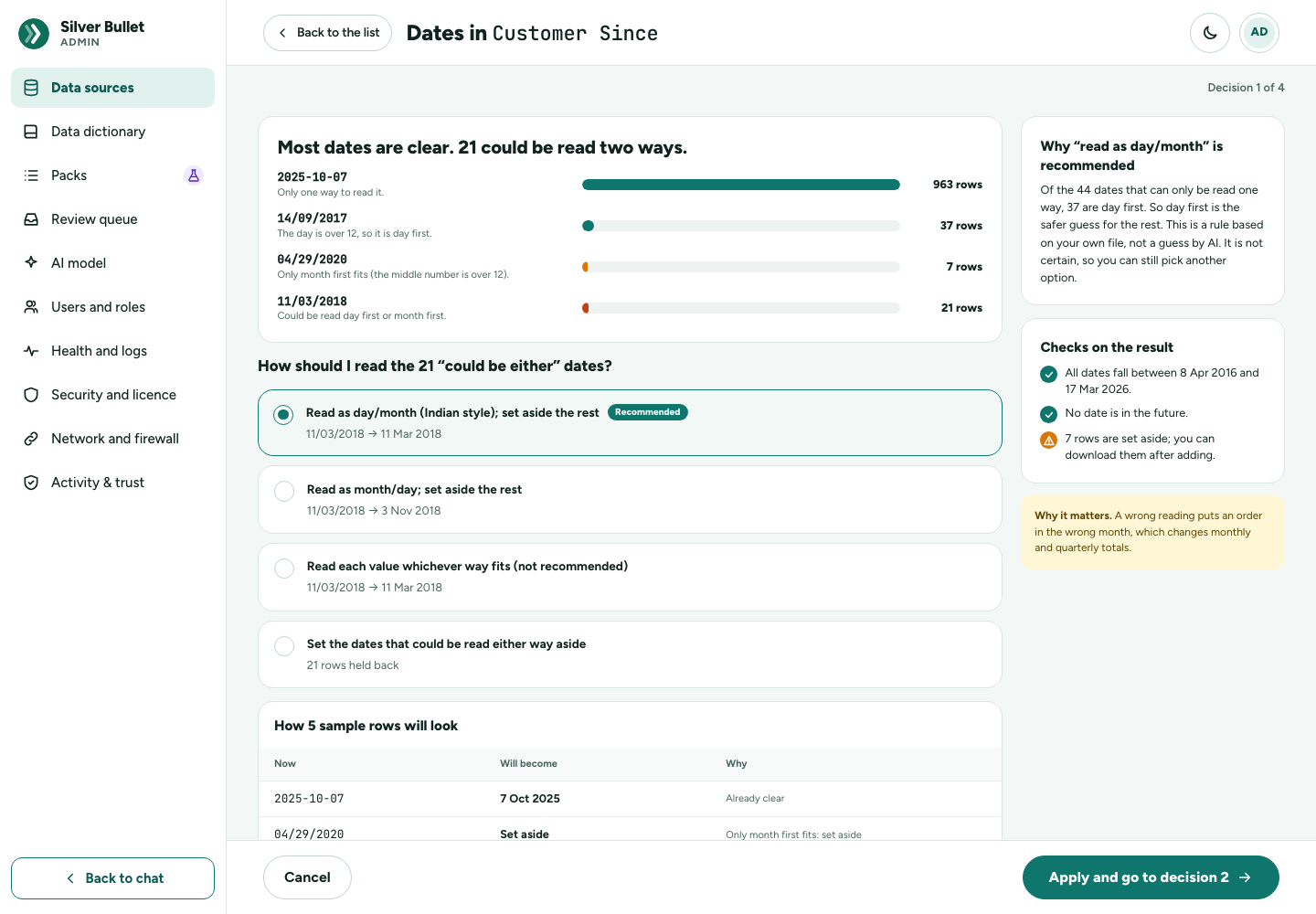
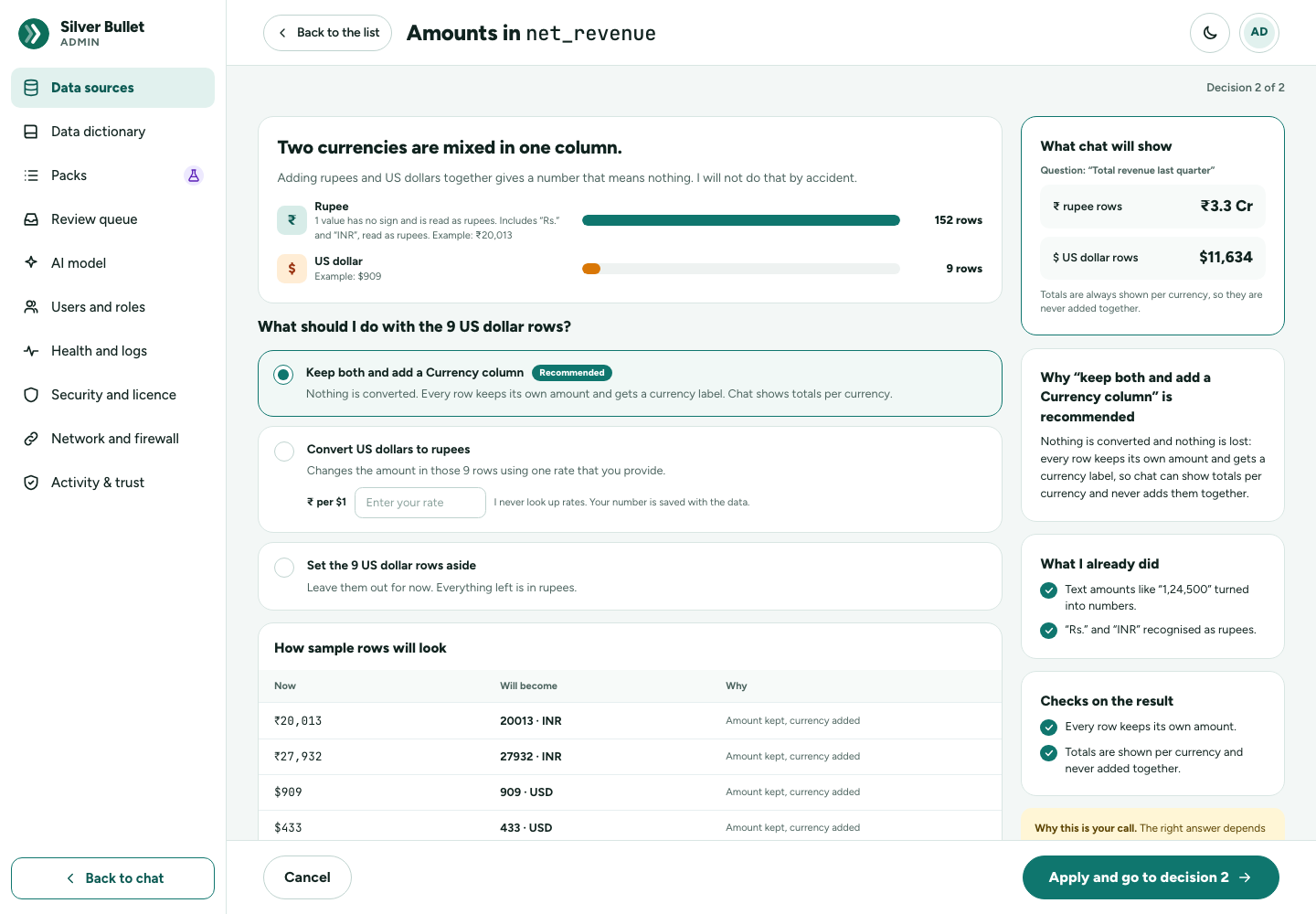
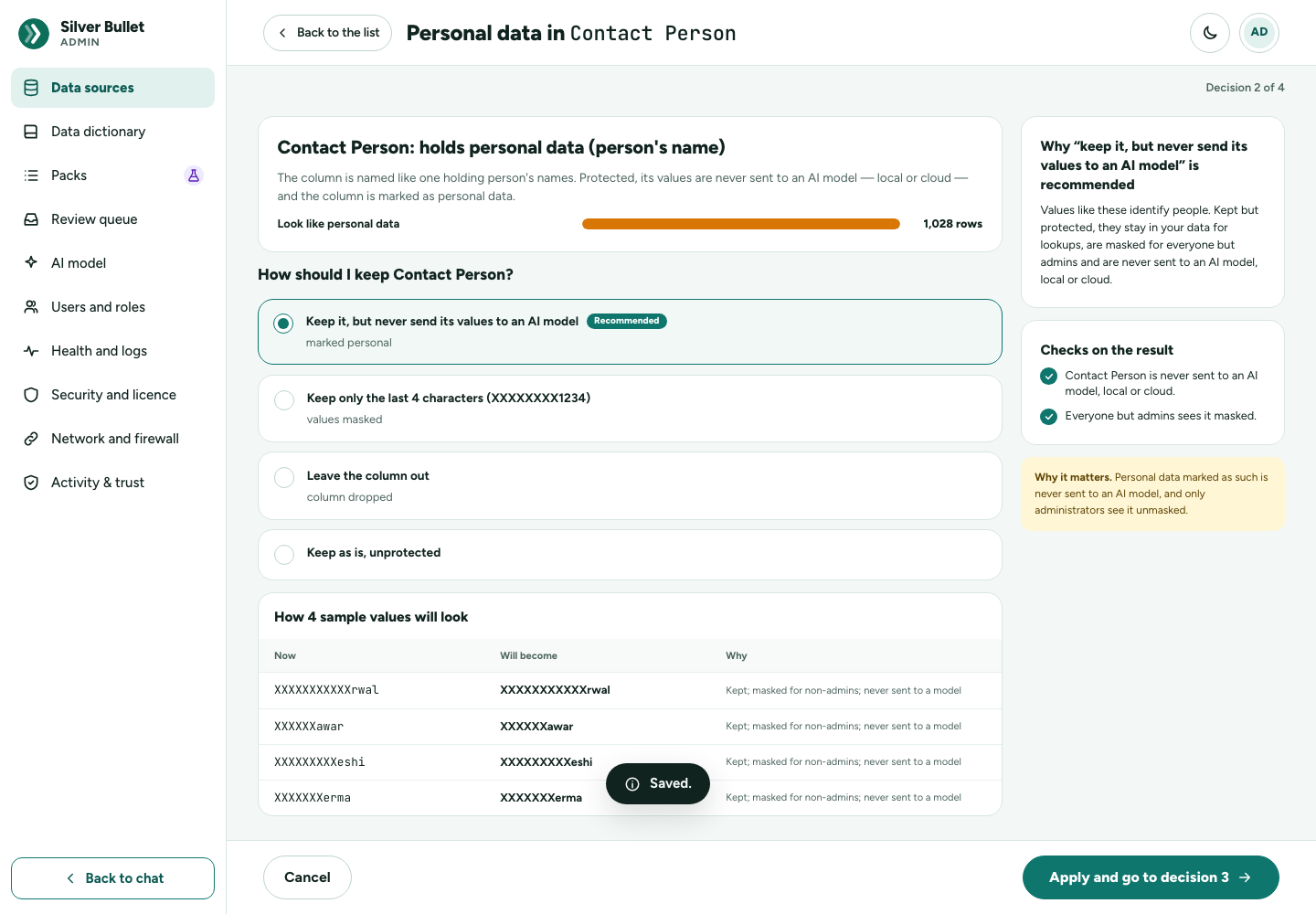
Decide (or Change, Take a look) opens one screen per decision, Decision n of N. Each screen shows the evidence (how many rows, with examples), the options with Now and Will become for sample rows, Why “…” is recommended, Checks on the result, and Why it matters. Apply and go to decision n moves on; Back to the list returns.
| Decision | The choices |
|---|---|
Dates written two ways (04/05/2024: April or May?) |
Read as day/month (Indian style); set aside the rest · Read as month/day; set aside the rest · Read each value whichever way fits (not recommended) · Set the dates that could be read either way aside. The recommendation comes from the dates in your own file that can only be read one way: a rule, not a guess by AI. |
Dates that could be read either way (every day 12 or less: 05-03-22) |
Read as day/month (Indian style) · Read as month/day · Read each value whichever way fits (not recommended). Recommended from the file’s other date columns on the same rows (a Months column with Mar-22 says month first), else day first. A column written month first throughout (04-30-22, 05-03-22) needs no decision: it is read month first and listed under Fixed automatically. |
| Two currencies in one column (₹ and $) | Keep both and add a Currency column (recommended: nothing is converted, chat shows totals per currency and never adds them together) · Convert … to … at a rate you type (Silver Bullet never looks rates up) · Set the … rows aside. |
| Personal data (names, e-mail, phone, Aadhaar, PAN…) | Keep it, but never send its values to an AI model · Keep only the last 4 characters (XXXXXXXX1234) (recommended for Aadhaar numbers) · Leave the column out · Keep as is, unprotected. A kept column is marked as personal data in the dictionary at once. |
| Invalid values (text in a number or date column) | Set these rows aside and load the rest (you can download them) · Load these rows with … left blank · Load … as text instead, keeping every row. |
| Months as columns (Apr, May, Jun… across the top) | Turn them into rows (with names for the new period and value columns) · Keep the columns. Questions about trends and quarters need the periods as rows; the numbers do not change. |
| Empty values in a label column (Optional) | Leave them empty, shown as “Not set” (recommended) · Write “Not set” into them · Set those rows aside. |
| A changed file | Compared with last upload: …: a column missing, renamed or of another type than in the file loaded before. Questions and boards built on the earlier file expect the column as it was; fix the file if the change is a mistake. |
Rows are never silently dropped: rows you set aside are kept and can be downloaded after the file is added.
Review before adding
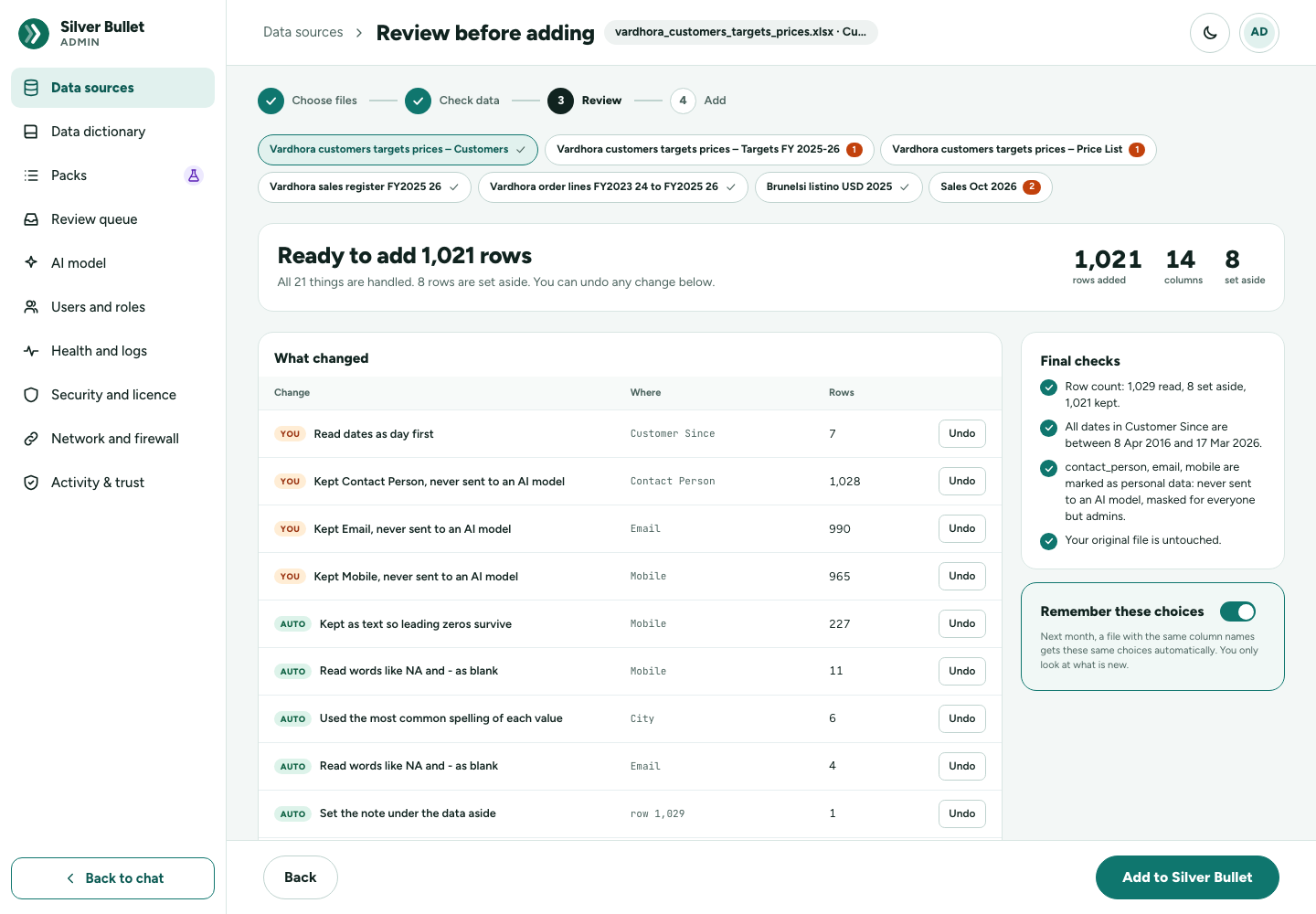
Next, review every change (the button says Review N changes) opens Review before adding: Ready to add N rows, with every change listed under What changed:
| Tag | Meaning |
|---|---|
| YOU | You chose it (or it was remembered from last time). |
| AUTO | Fixed automatically. |
| SKIP | Left as it is. Change opens its screen. |
| TO DO | Still needs your decision. |
| NOTE | Something noted, with nothing to choose. |
Undo puts any change back to “as it is”; Use again restores it. Final checks confirm the row count, the date range, which columns are protected as personal data, and that your original file is untouched.
Remember these choices: next month, a file with the same column names gets the same choices automatically, and you only look at what is new. A conversion rate is never reused.
Press Add to Silver Bullet.
Add
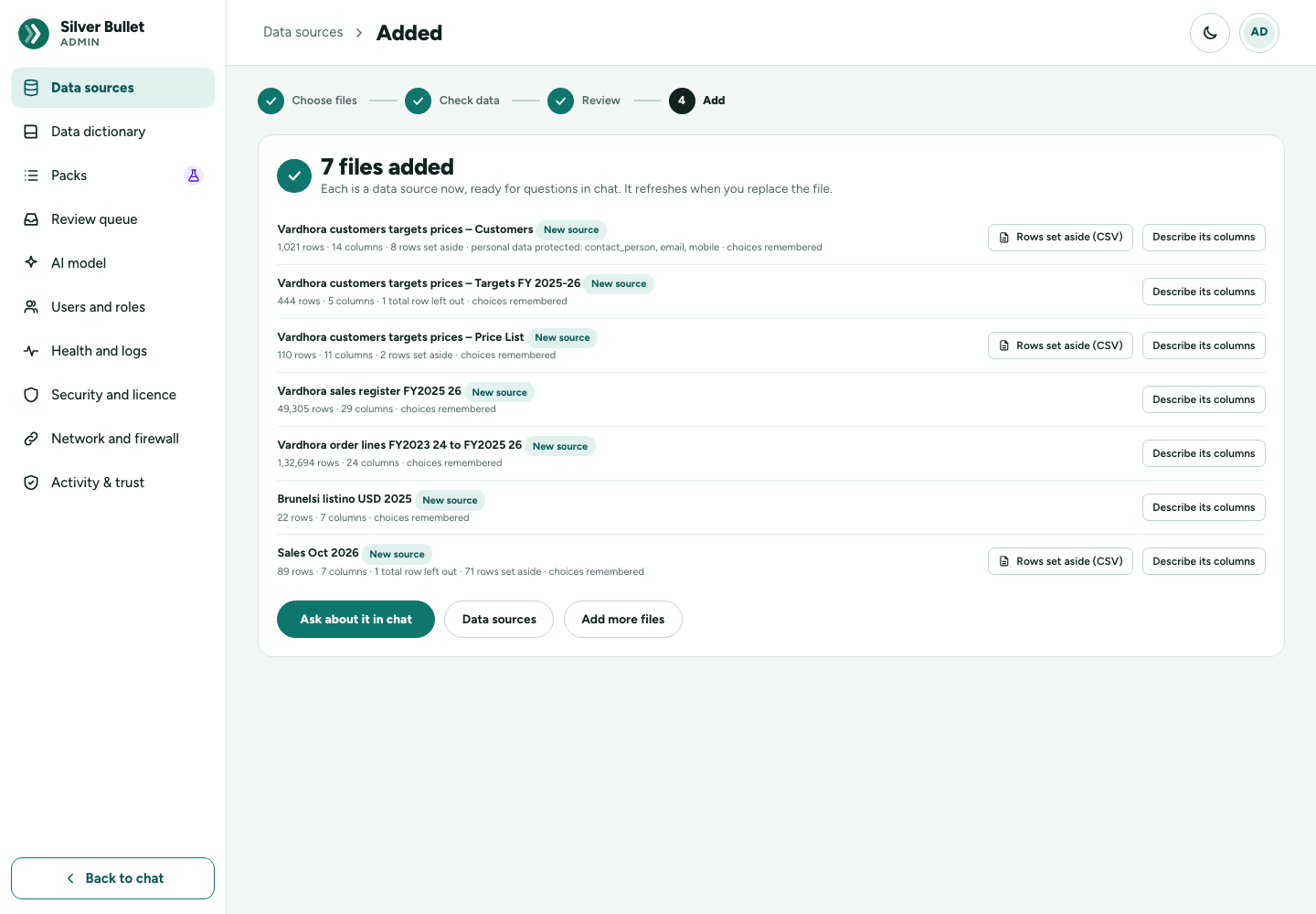
N files added: each file is now a data source, ready for questions, with its rows, columns, rows set aside, total rows left out, personal data protected and whether choices were remembered. For each:
- Rows set aside (CSV) downloads the rows that were set aside, with the reason for each, so they can be fixed in the file.
- Describe its columns opens the data dictionary.
Ask about it in chat, Data sources and Add more files finish. If the import holds more files, Continue with it goes on to the next.
Replace a file later
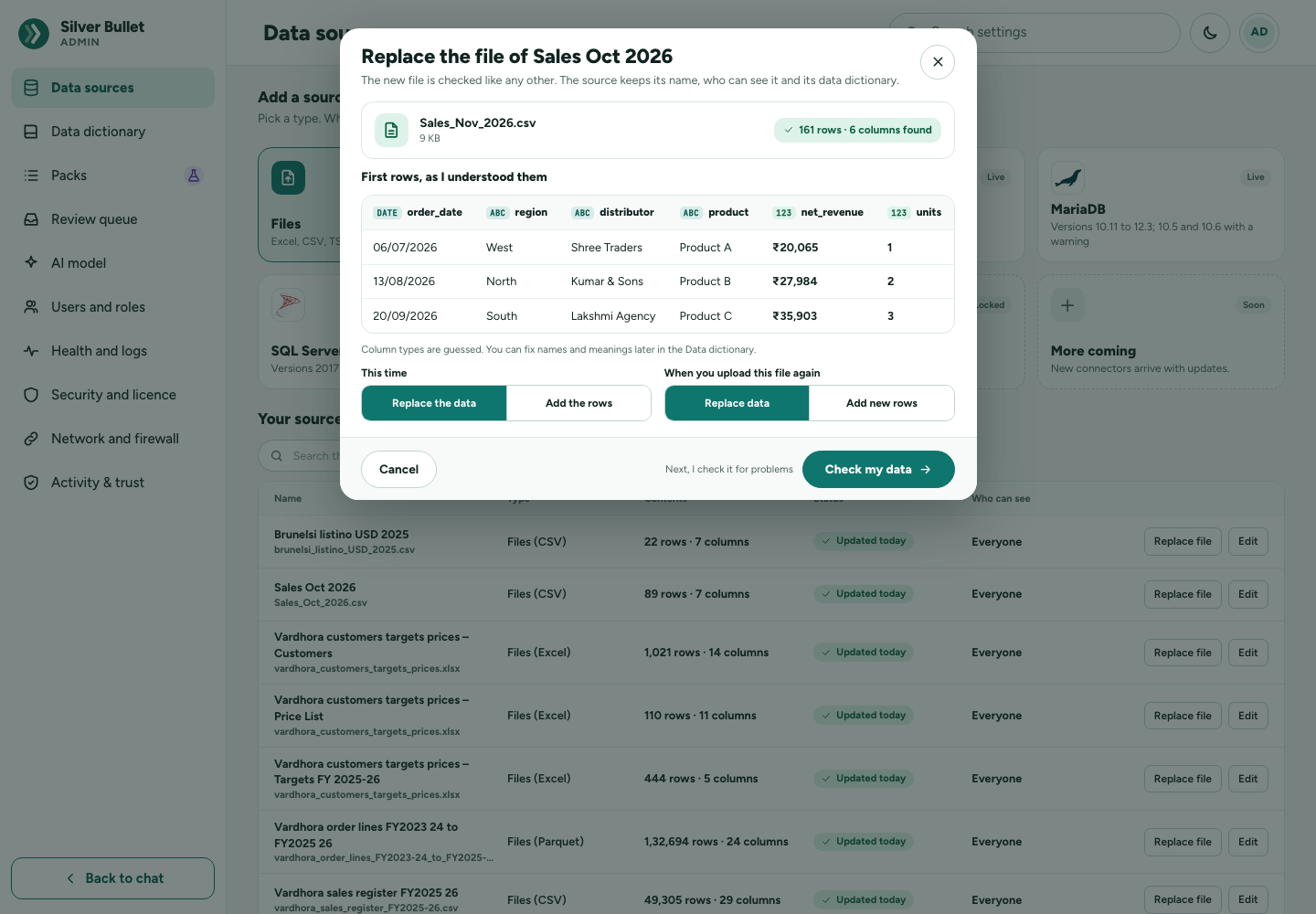
Replace file, in the Your sources table or on the source’s edit page, opens Replace the file of Sales Oct 2026. The new file is checked like any other; the source keeps its name and its data dictionary. This time chooses Replace the data or Add the rows. Adding rows needs the same columns (names and types) as the data already loaded; otherwise choose Replace the data, or fix the file. With Remember these choices used last time, only what is new needs a look.
The brief and boards of a file source are worked out again when its file is replaced, not on a timer.
Data dictionary and rules
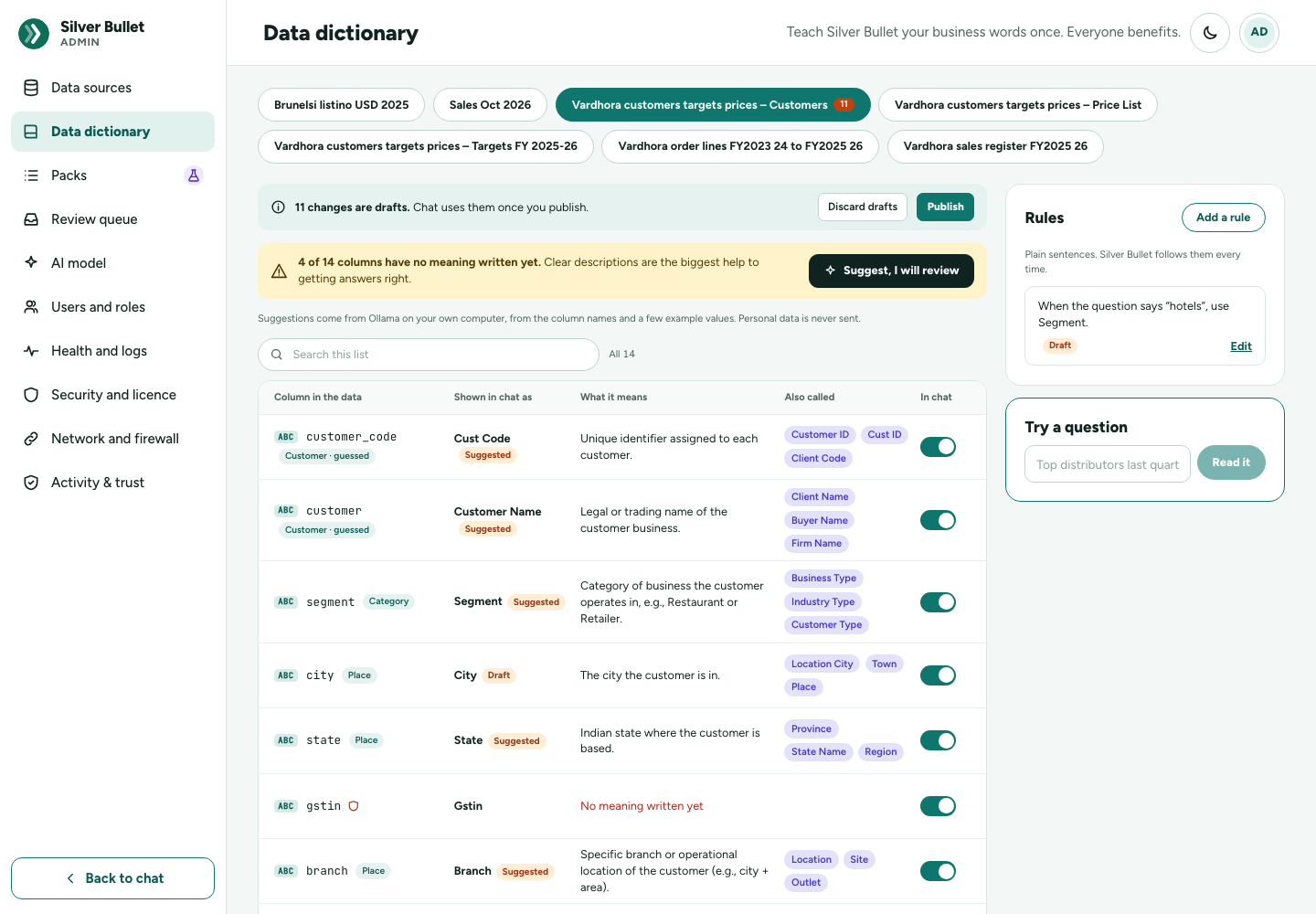
Admin → Data dictionary: Teach Silver Bullet your business words once. Pick a source at the top; a database with several tables also has a Table picker. The columns come from the source’s last successful test.
Columns
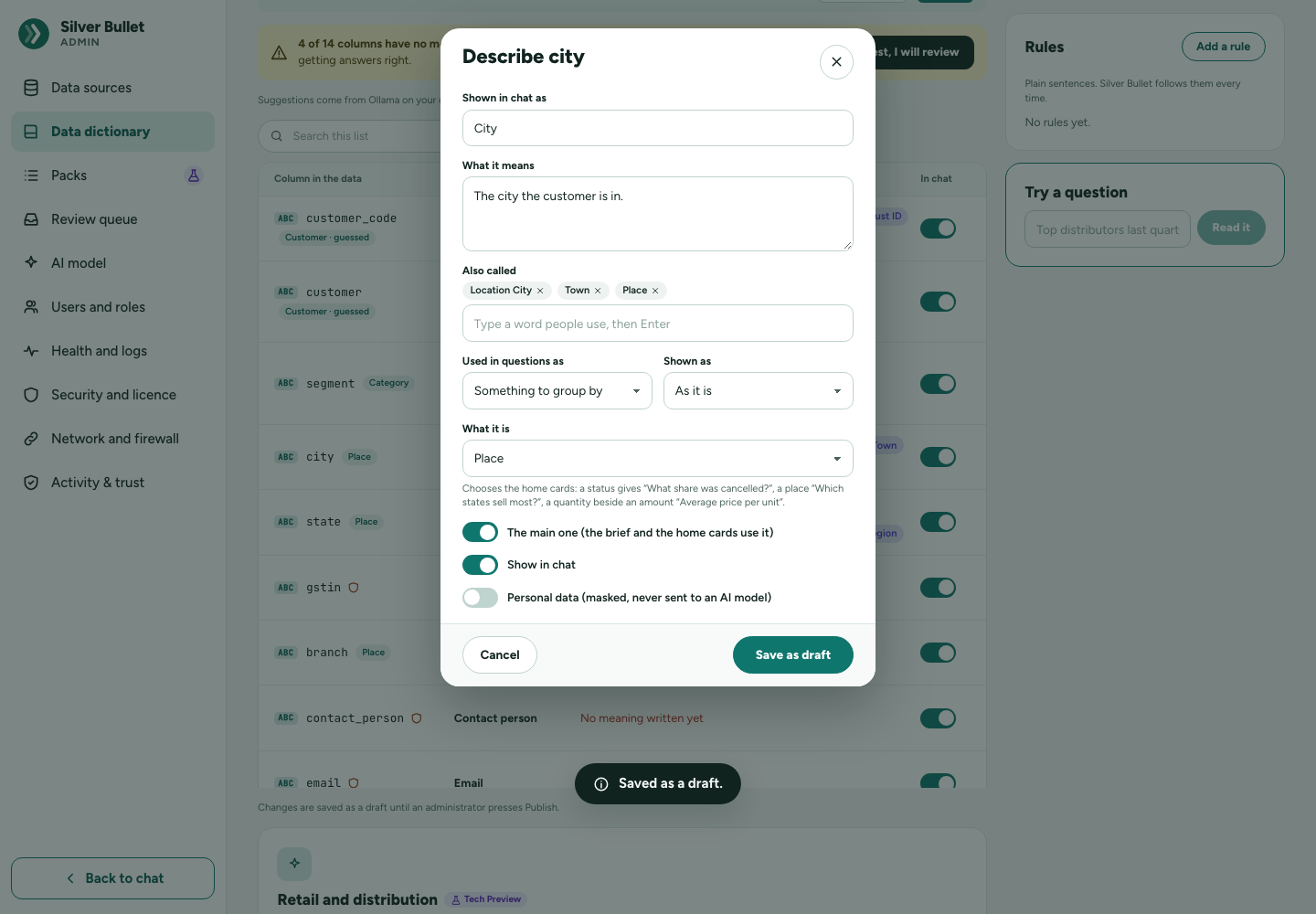
The table shows Column in the data, Shown in chat as, What it means, Also called and In chat. Press a column to open its Describe window (for example Describe order_date):
| Field | What it does |
|---|---|
| Shown in chat as | The chat name, used in answers and chips. |
| What it means | One plain sentence, for example The day the order was placed, not the day it shipped. Clear meanings are the biggest help to getting answers right. |
| Also called | Other words you use (type a word, then Enter). A question using one of them is read as this column. |
| Used in questions as | Something to add up, Something to group by, The date, An id, Something to filter by, or Not set. |
| Shown as | As it is, Money (with a Currency, for example INR), Number, Percent, Date. |
| The main one (the brief and the home cards use it) | Shown for something to add up, to group by, or the date: marks the source’s main figure, grouping or date. |
| What it is | Money, Quantity, Price or rate, Percentage, Status, Place, Customer, Product, Category, Channel, Salesperson, Order or invoice number, Due date, Payment date, Nothing in particular, or Let Silver Bullet decide. Chooses the home cards (see Column semantics and the home cards below). |
| Show in chat | Off hides the column from chat. |
| Personal data (masked, never sent to an AI model) | The column’s values are never sampled and never sent to any model. As the administrator you still see them in your own answers. A column whose name says it holds personal data (e-mail, phone…) is treated as such anyway. |
The main measure, grouping and date. The brief and the home cards are
worked out from the source’s main figure, grouping and date. Mark them with
The main one in a column’s Describe window (then Publish), or with
Main in the add-database wizard’s Name things step. For a file,
Silver Bullet guesses them when the file is loaded (and again when it is
replaced), so the home page works at once: the main measure is the best money
column (Amount, Sales, Gross amt…, never an ID, a postal code, a rate
or a percentage; a quantity such as Qty or PCS is a second measure), the
date the transaction date, and the main grouping a column with 2 to 50 values
covering most rows (Category, State, Region, Status, Channel…). The
dictionary marks them Main measure · guessed and the home page says The
cards add up … guessed by Silver Bullet from the file. Change in the Data
dictionary. Change any of them and publish: what you publish is yours, and is
never guessed over. Files loaded by an earlier version are guessed for once
when Silver Bullet starts; dates such a file kept as text (04-30-22) are
read as dates then, when every value can be read only one way round;
otherwise use Replace file with the same file.
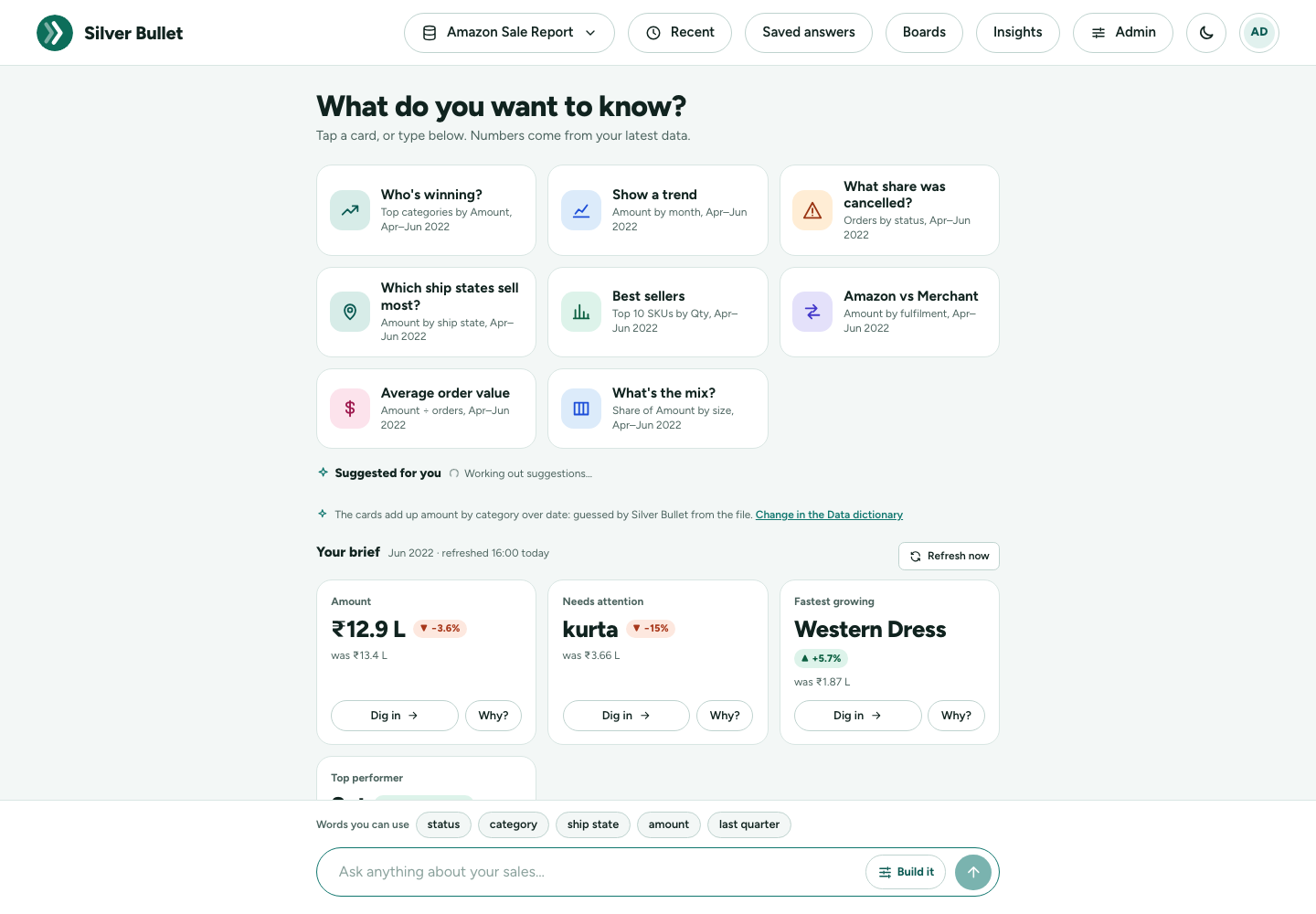
For a database without a main measure, Silver Bullet uses the measure you asked about most on that source, or else guesses the likeliest money column, and the guess can be poor. A source with nothing to add up (no amount, quantity or price) has no cards; the home page says No cards for this data yet: it needs a figure to add up (an amount or a quantity).
Column semantics and the home cards
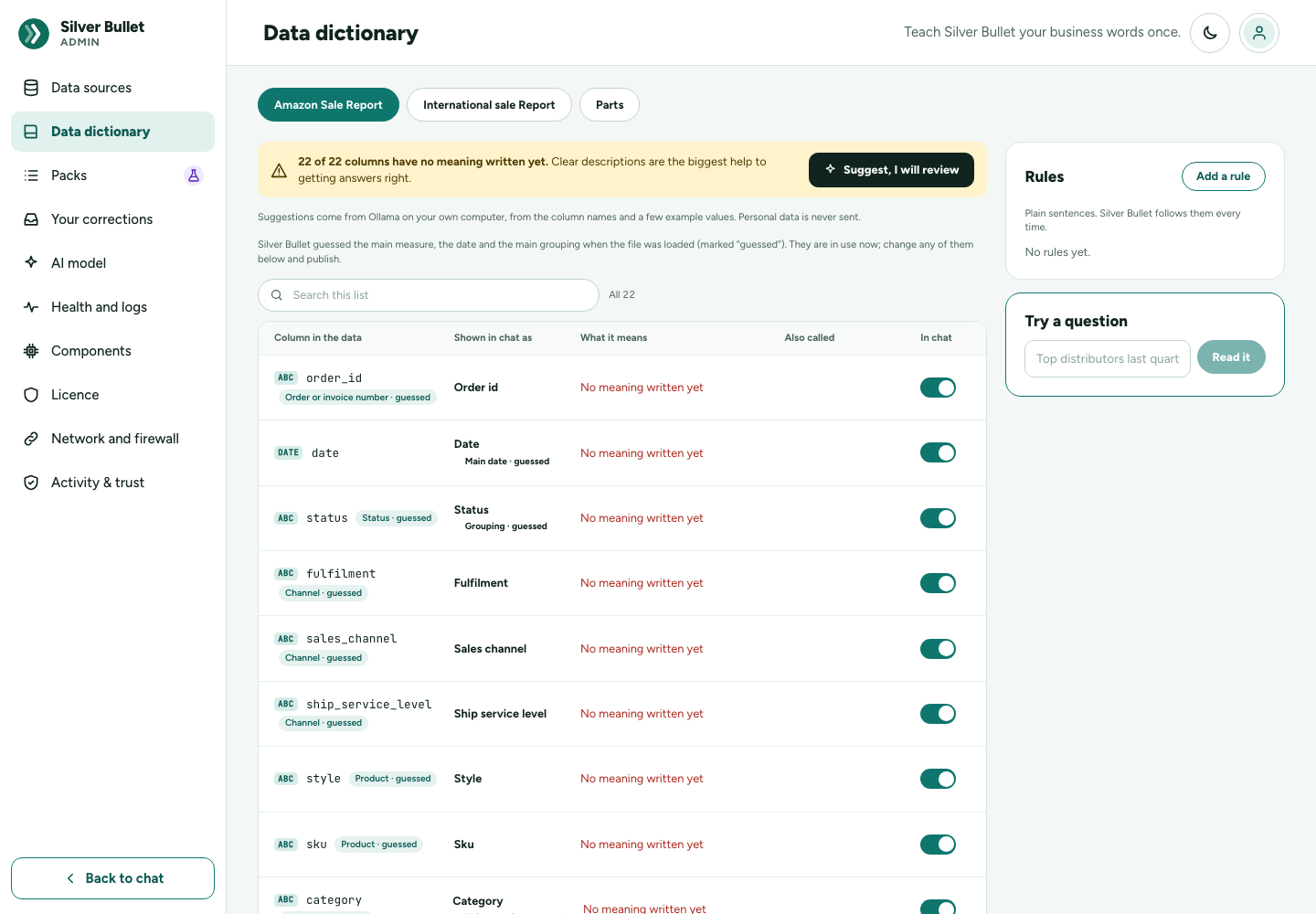
Beyond the main measure, grouping and date, Silver Bullet works out what
each column is: money, a quantity, a price or rate, a percentage, a
status (Shipped, Cancelled, Paid…), a place (states and union
territories, big Indian cities, regions, countries by name or ISO code), a
customer, a product (product, item, SKU, style, ASIN), a category (category,
segment, brand, size…), a channel (channel, fulfilment, platform), a
salesperson, an order or invoice number, a due date or a payment date. It
reads the column’s name and, for text, its values (the short lists the
vocabulary already holds, never a personal-data column’s); for a loaded
file it also reads each number column’s range once (GST % loaded as gst
holds 5, 12 and 18: a rate, not an amount). The dictionary shows each as a
tag after the column name (Status · guessed); change it in the column’s
Describe window under What it is, then Publish. What you
publish is never guessed over; Nothing in particular stops the guess for
that column.
The home cards are chosen from a catalogue by what the columns are, and worded with the data’s own names:
| Card | Shown when the data has | Worded like |
|---|---|---|
| Who’s winning? | a measure and a grouping (the main one) | Top categories by Amount, Apr–Jun 2022 |
| Show a trend | a measure and a date with two months or more | Amount by month, Apr–Jun 2022 |
| What’s overdue? | a due date and an amount (unpaid only, with a payment date or a paid status) | Outstanding amount past its due date, by customer |
| What share was cancelled? | a status with a cancelled, returned, rejected… value | Orders by status, Apr–Jun 2022 |
| Which states sell most? | a place | Amount by ship state, Apr–Jun 2022 |
| Top 10 customers | a customer column | By Gross amt, Jan–Mar 2022 |
| Best sellers / Slow movers | a product, item, SKU or style | Top (lowest) 10 SKUs by Qty, Apr–Jun 2022 |
| Who sells most? | a salesperson | Net amount by sales rep, Jan–Mar 2026 |
| A vs B | a channel or other column with exactly two values | Amazon vs Merchant: Amount by fulfilment |
| Average order value | money and an order or invoice number | Amount ÷ orders, Apr–Jun 2022 |
| Average price per unit | money and a quantity | Gross amt ÷ Pcs, Jan–Mar 2022 |
| What’s the mix? | a category-like column with 3 to 12 values | Share of Amount by size, Apr–Jun 2022 |
| What changed? / Who’s slipping? / Change since last period | a date whose data covers the period before (or the year before) | Amount by category, Jun 2022 vs May 2022 |
| Best and worst month | a date with three months or more | Amount by month, ranked |
| Look up one number, How many sold?, How many orders? | a measure, a quantity, an order number | Total Amount, FY 2022-23 so far |
The candidates are ranked (the dictionary’s main grouping and the table of the main measure first, sales data with an amount over time before a list of things) and the first six to eight that fit and answer are kept: each card’s choices must pass the same check as any question, and its query is run once over its period and must return a figure. Periods are anchored to the data’s latest date. A list of things (customers, a price list) gets only counting or averaging cards. On All my data the best cards across the sources are shown, each source’s best one at least, labelled with the source’s name.
The cards are worked out when the data or what describes it changes (a file loaded or replaced, the dictionary published, a correction made a verified answer with a rule, a database on its brief schedule, and once when Silver Bullet starts for a source that has none yet) together with the brief, and kept. Opening the home page never queries the data. Refresh now beside Your brief works them out again too.
Suggested for you
Under the cards the home page shows Suggested for you, a mix of:
- You often ask: questions of that source you asked, tapped or saved at least 3 times in the last 90 days, the same reading counted once however it was worded; never one whose answer you marked wrong (No or Still wrong) or a correction still waiting under Your corrections. This needs no AI model and is read from Silver Bullet’s own records, not the data.
- AI suggestions: when the data or its description changes, the AI model is asked for 8 questions people in this business would ask, in their own words. Each is read into choices (by the parser, else by the model’s usual reading of a question), kept only if it fits the choices fully, passes the check and its query returns a figure, and is not a home card again; the best 4 are kept with the source, as fixed choices (the data’s own periods). It runs in the background, one source at a time: the home page shows the earlier suggestions (or none) meanwhile, and a model that is slow or not running never holds the page up. The row then shows only what you ask often, and the reason is in the log.
Refresh suggestions on the row asks the model again for the picked
source (or every source for All my data), in the background. The
suggestions can be switched off under Admin → AI model → Suggested
questions on the home page (on by default); the questions you ask often
stay. What the model is sent is listed in the
Security and Privacy Guide (Other calls to the
model). With the local model qwen3-coder-next a run takes about 30–45
seconds per source.
Suggest, I will review asks the AI model to draft meanings for columns that have none. With a local model it reads the column names and a few example values; with a cloud model, the column names only. Personal-data columns are never sent. Each suggestion is marked Suggested: check it before publishing.
Business measures
Measures are business numbers with their exact sum, such as Net revenue =
SUM(net_amount). Add a measure: Name in chat, the Table, How it
is worked out (one SQL expression over that table, such as SUM(net_amount) - SUM(returns)) and What it means. The expression is checked on the data
before it is kept. You then ask for it by name.
Rules
Rules are plain sentences Silver Bullet follows every time. Add a rule and choose its Kind of rule:
| Kind of rule | Example | What it does |
|---|---|---|
| When the question says a word, use… | When the question says “turnover”, use Net revenue. | The word means that measure or column. |
| Always leave out (or keep only) some rows | Leave out rows where Order status is Cancelled. | Added to every new question on that table, unless the question names that column itself. Shown as a chip you can remove. |
| When no period is named, use… | this financial year so far | The period used when a question names none. |
| Periods in a table use this date | Invoice date | Which date a period applies to in that table. |
| Just a sentence, for people | (none) | Shown with answers and given to the AI model as a note; not applied by itself. |
The rule’s sentence is written for you from the choices; change the words if you like. Tick For every data source to apply a rule to all your sources. Each rule shows how often it was used. Retire the rule stops it.
Try a question
Try a question shows how a question would be read with the words as they are (the data, measure, split, period, filters and so on) without running it. Use it after publishing to check a new word or rule.
Drafts and Publish
Every change (column, measure or rule) is a Draft until you press Publish: Changes are saved as a draft until you press Publish. Publish makes chat use them at once. Discard drafts throws the drafted names, meanings and words away; the published ones stay.
Publishing also works out the source’s brief again.
Your corrections and the safety check
Every “No, fix it” you tap lands in Admin → Your corrections. The menu item shows how many are waiting.
A correction is in use for you as soon as you make it: your corrected answer is marked Not yet reviewed, and you get it again if you ask the same question. Checking it here (the fixes below, then the safety check) makes it a verified answer that Silver Bullet learns from, so the same question asked in other words gets it too. How Silver Bullet learns explains the whole loop.
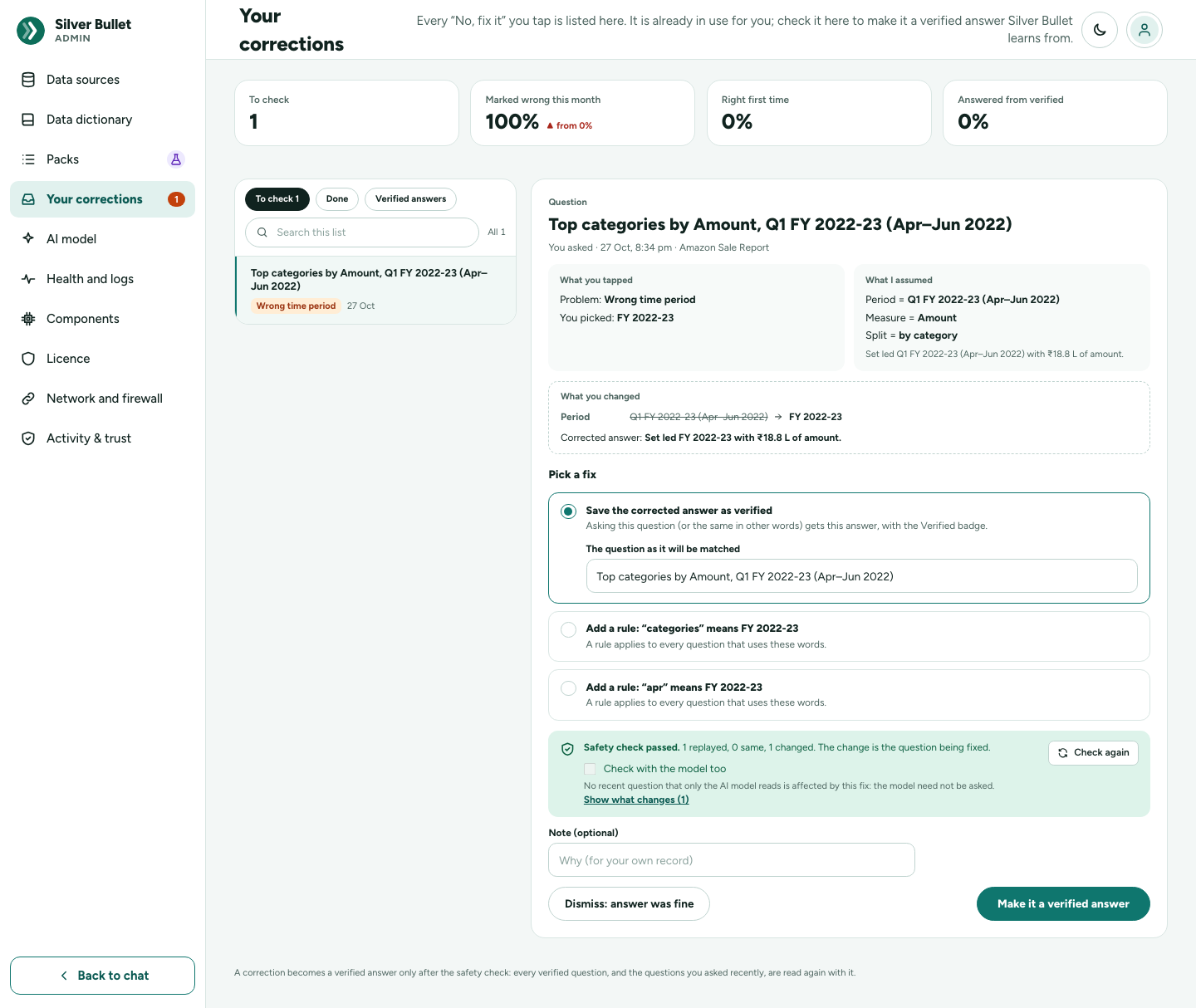
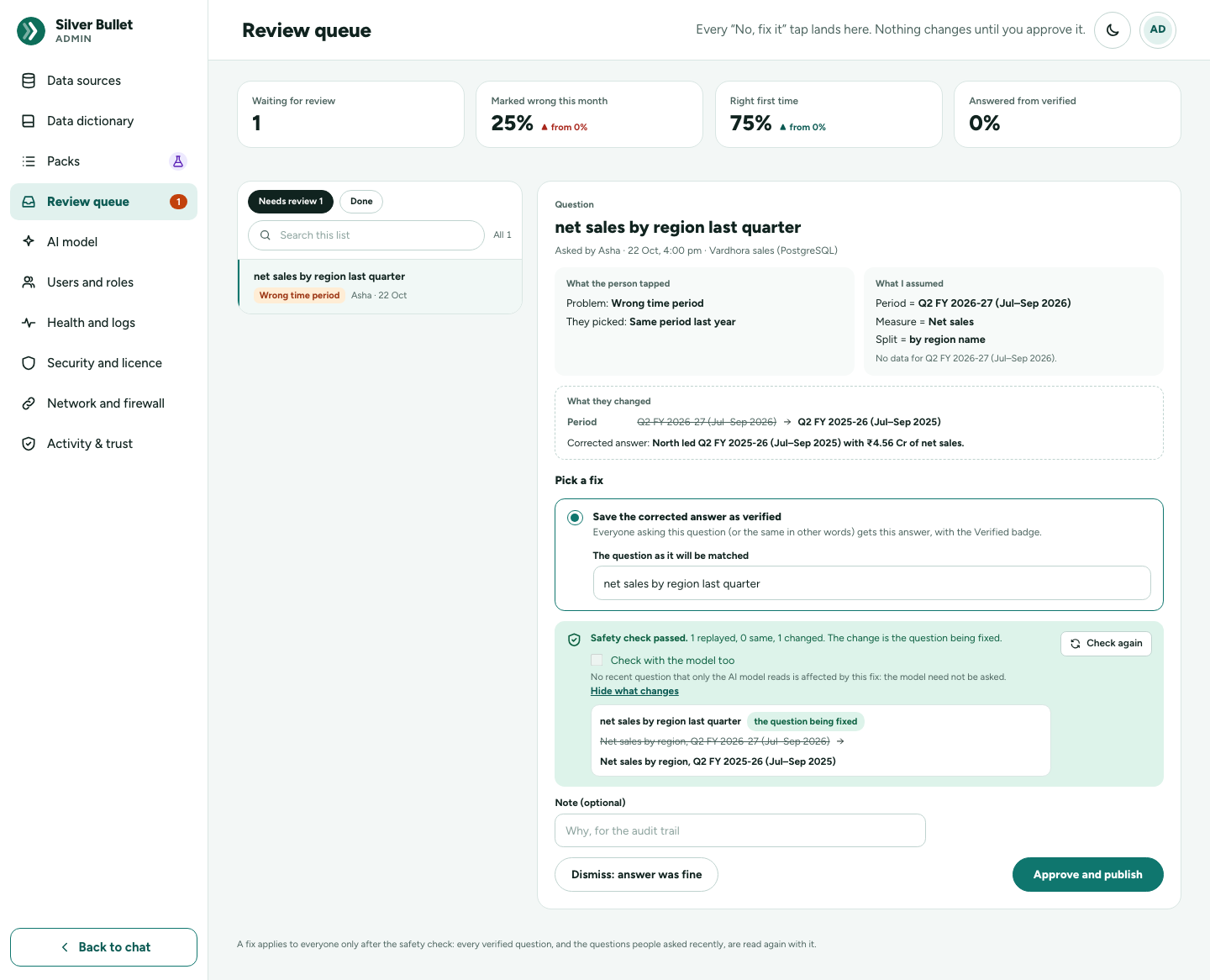
The headline numbers
| Number | Meaning |
|---|---|
| To check | Corrections not yet decided. |
| Marked wrong this month | Answers marked wrong this calendar month, as a share of the month’s answers. |
| Right first time | Answers to new questions (typed, tapped, built, shortcuts) that you did not mark wrong. |
| Answered from verified | Answers that came from a verified answer. |
Each shows last month’s figure beside it.
One correction
To check and Done list the corrections, each with its problem (Wrong time period, Numbers look wrong, Misread a word, Something missing, Chart confusing, Wrong measure, Something else). Open one to see the Question and when you asked it, What you tapped (the problem and what you picked, or None of these — you kept a note with your note), What I assumed (the period, measure, split, filters, ranking), What you changed, and the Corrected answer.
Pick a fix
Silver Bullet suggests fixes worked out from the tap:
| Fix | What it does once saved |
|---|---|
| Save the corrected answer as verified | This question, and others that mean the same, always get the corrected answer, with the Verified badge. The question as it will be matched can be edited. |
| Save a corrected query as verified | For an answer that was written as a query rather than from the usual choices: correct the query; it is checked by the safety layer before it is kept. |
| Add a rule: “recently” means last 3 months | A word the question used now means the period you picked, for every question. |
| Add a rule: questions without a period mean … | A default period. |
| Add a rule: leave out rows where … | A filter you added, applied to every new question on that table. |
| Add a word: “turnover” means Net sales | Another name for the measure you switched to. |
The word and period of a rule, and the word of a new name, can be edited. When nothing can be worked out (No fix can be worked out from this tap), dismiss it, or add a rule or a word in the Data dictionary.
The safety check
Run the safety check reads every verified question, and the questions you typed on this source recently (the last 90 days, at most 200), again with the fix applied, in a sandbox. Nothing is saved by the check, no model is asked and no database is queried. The result reads, for example, Safety check passed. 12 replayed, 11 same, 1 changed. The change is the question being fixed. Show what changes lists each changed question, before and after. Questions only the AI model can read are counted separately: N need the AI model and were not replayed.
Check with the model too. The replay does not ask the AI model, so it cannot see a question only the model reads. A fix can still change such a question’s answer by changing what the model is told: a verified reading is shown to the model as an example for nearly the same questions, and a rule or a new word is part of every question’s instructions. With Check with the model too (on whenever an AI model is answering), the safety check also:
- compares, for each recent question only the model reads, what the model would be told with and without the fix; where nothing changes, the answer cannot change and the model is not asked;
- asks the model the others (at most 40, those about what the fix touches first, then spread across tables), with and without the fix. Nothing is run against your data and nothing is saved;
- asks again, without the fix, any question whose reading differed, to tell a real change from the model’s own variation.
Before you run it, the option says how many questions it will ask and about how long it will take (from how long the model took on this source recently), for example Asks the AI model again about the 6 recent questions only it reads that this fix could change, with and without the fix — about 1 min. It stops after 5 minutes; anything not checked by then is listed as not checked. The result adds a line such as Model check: 6 asked, 5 same, 1 would change; Show what changes lists those questions marked only the AI model reads it. Questions the model read two ways even without the fix are listed as the model varies and do not stop saving. When no AI model is answering, the option is off and says why.
Make it a verified answer, or dismiss
- Make it a verified answer runs the check again, then applies the fix. Add a note for your own record if you like.
- If anything other than the question being fixed would change, in the replay or in the model check when it was on, saving stops and lists the other answers that would change. (A model check run in the last 30 minutes for the same fix is reused, so saving does not ask the model again.) Look at every listed change; Accept these changes and save only if every one is right.
- Dismiss: answer was fine closes the correction; nothing changes.
Decided corrections move to Done, with when they were decided.
Writing the right query yourself
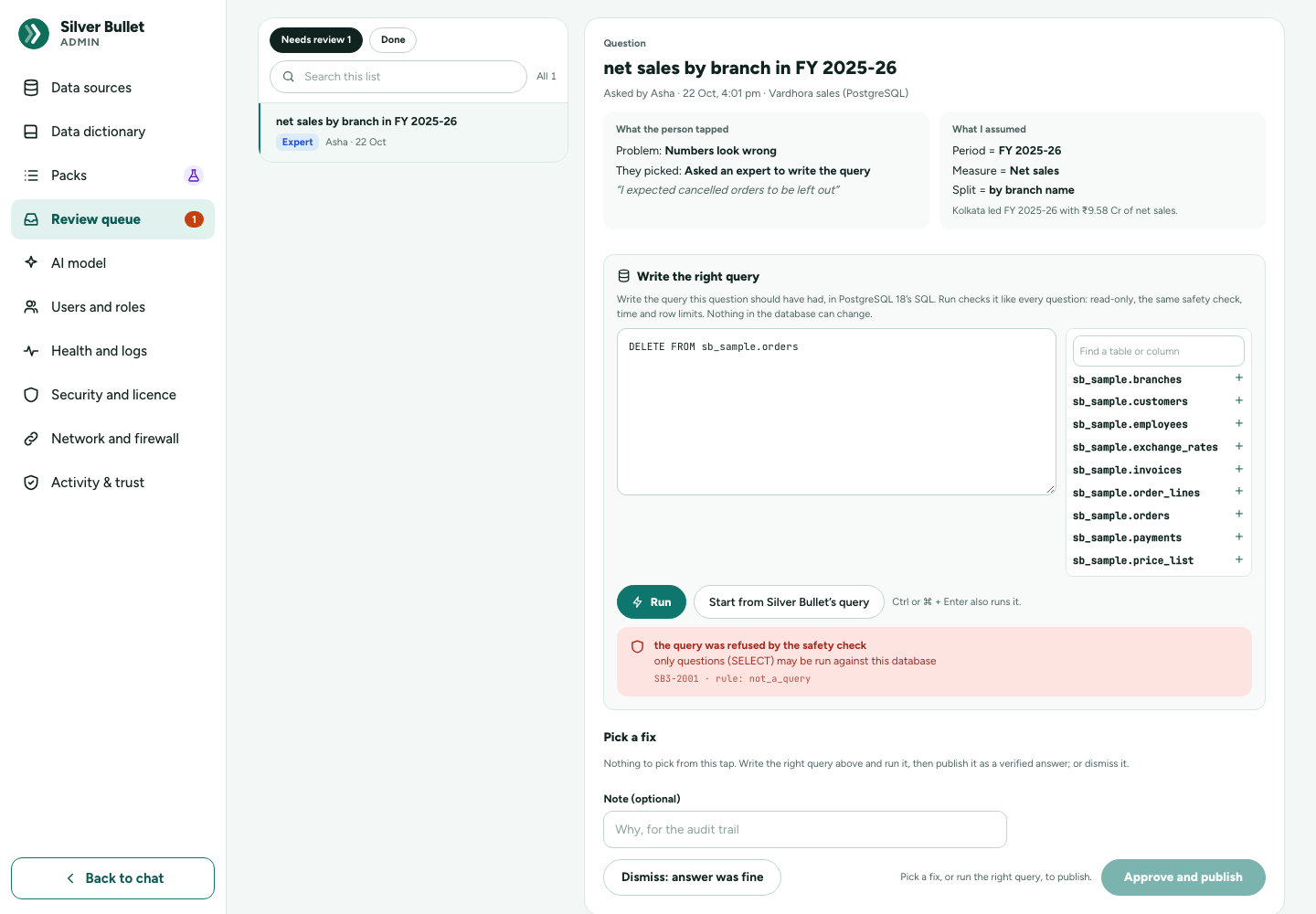
You are your own expert. Under No, fix it, I will write the right query myself keeps the question under Your corrections, marked Expert, with your note (“I expected cancelled orders to be left out”) and what Silver Bullet assumed. Below them is Write the right query:
- The SQL editor is a plain text box in the database’s own SQL. Beside it are the source’s tables and columns (the ones its last connection test found, which are the only ones the safety check allows), with their types and personal-data marks; Find a table or column narrows the list, and a click puts a name into the query at the cursor. Start from Silver Bullet’s query fills the box with the query that gave the wrong answer.
- Run (or Ctrl/⌘ + Enter) runs your query through exactly the same
path as every question: the read-only login, the safety check against the
tables you exposed, the time and row limits. Nothing in the database can
change: a
DELETE, anUPDATEor a second statement is refused, and the page shows the safety check’s words, its code (SB3-2001) and its rule (not_a_query, denied_keyword, object_not_allowed …).
-
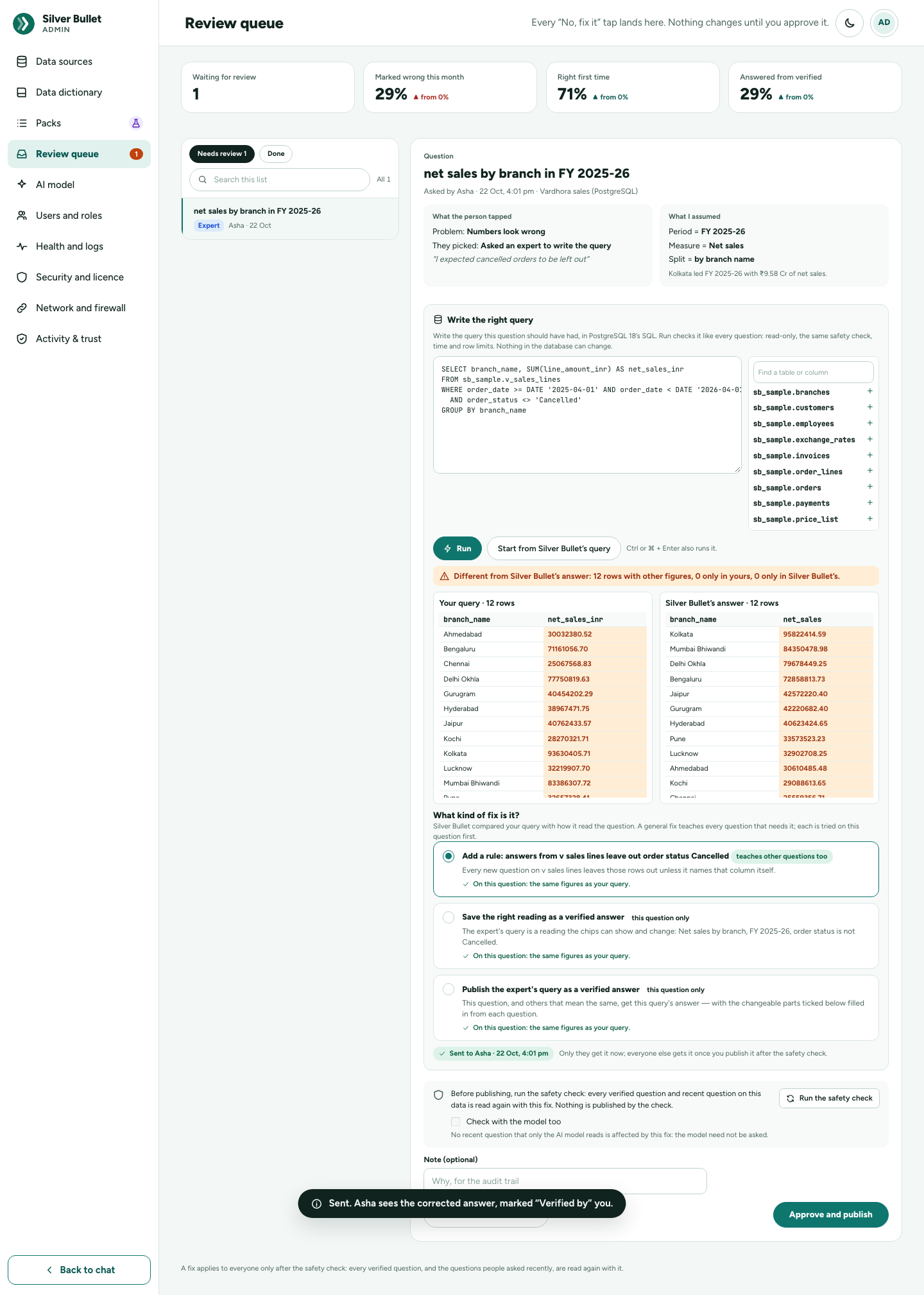
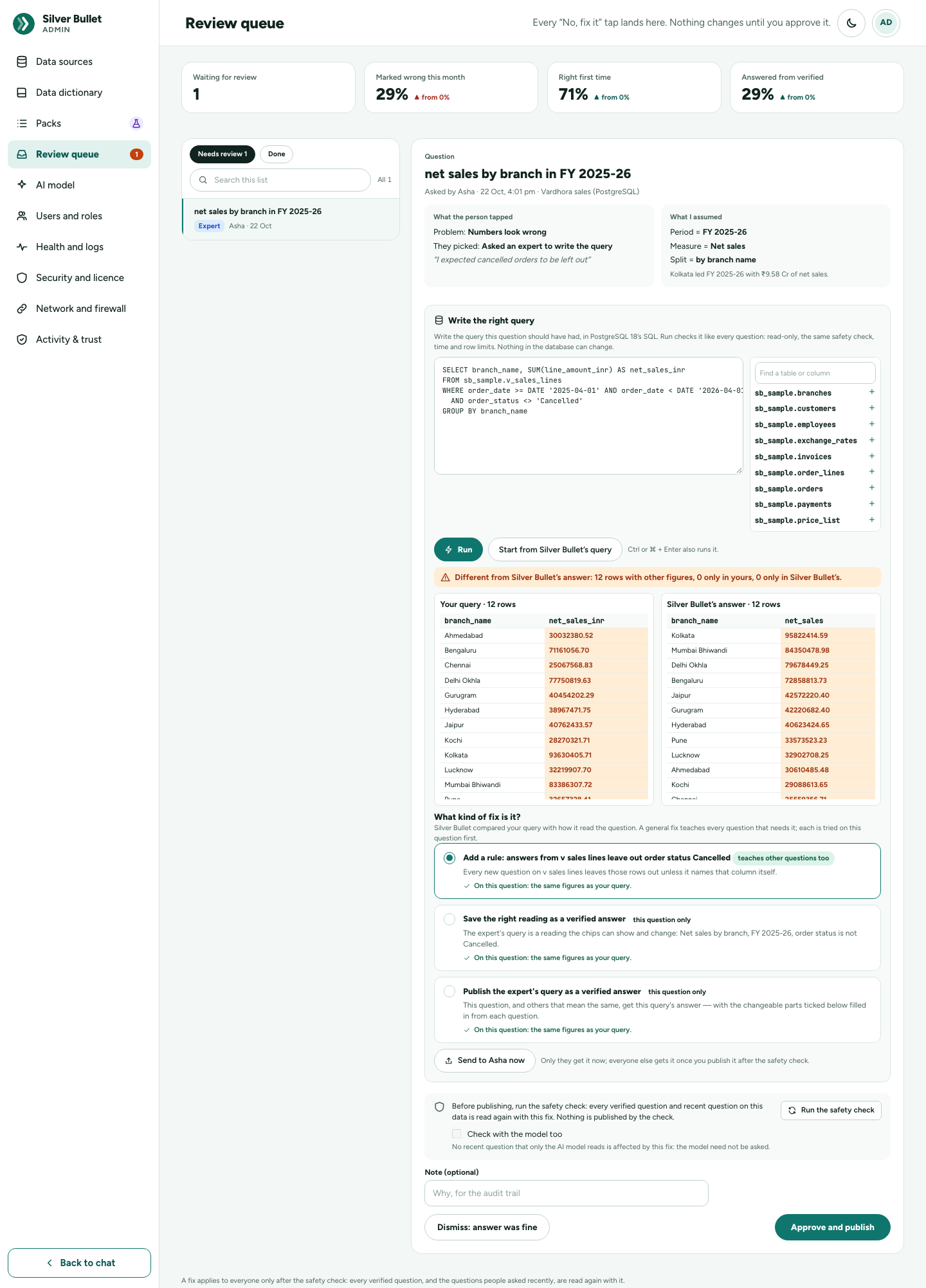
Side by side: your result (Your query · 5 rows) and Silver Bullet’s answer run again beside it. Figures that differ are marked, and rows only one side has are shown in red; the line above says Same figures as Silver Bullet’s answer or how many rows differ. Column names and row order do not matter: a “count of orders” and an “orders” column are the same when their figures are.
-
Send … now puts the corrected answer in your conversation at once, marked Verified by you, and your same question gets it while the correction waits.
-
What kind of fix is it? Silver Bullet compares your query with how it read the question and proposes the lessons it can see, each tried on this question first (On this question: the same figures as your query):
Fix When What is saved Add a business measure your figure is a calculation (Discount given = SUM(quantity × unit price − line amount)), or you counted orders where Silver Bullet counted order lines (Orders = COUNT(DISTINCT order_id)) a business measure, with its other names: every question that names it uses it Add a rule your query leaves out rows Silver Bullet kept (cancelled orders), or limits the period on another date a rule for the table Add a saved view your query joins tables a named view of the joined rows that the chat treats as a table: choices, chips and cards work over it; questions that name it are read over it Save the right reading your query is something the chips can say a verified answer with that reading Publish the expert’s query always a verified answer backed by your query (this question only) Fixes marked teaches other questions too change how other questions are read; the others answer only this question and those that mean the same. A measure’s name and other names, and a view’s name and query, can be changed: Try it on this question runs it again. A general fix also keeps this question as a verified answer.
-
Changeable parts. Under Publish the expert’s query, Silver Bullet lists the parts of your query likely to vary (the period: FY 2025-26 (order date), the day: 2024-08-15, region name = West, the number of rows: 5), ticked when they usually change. Ticked parts are filled in from each question: the same question for FY 2024-25, only South, top 10, and, in a conversation, short follow-ups such as the same for last month or only West, always as values Silver Bullet writes itself (dates as dates, a value only when the column has it). The rest stay as you wrote them. The answer says what it was filled with: The expert’s query, for FY 2024-25 · region name South.
-
The usual safety check (and model check) runs before you save it, with the measure, rule or view applied, and a measure or view is checked through the safety layer again as it is saved. Once saved, this question and others that mean the same get the right answer, marked Verified by you.
Kept correct. Every night (2 am by default, while Silver Bullet is running) each expert answer and saved view runs again through the safety layers, and a source’s saved views also after every connection test. If one fails, or its result’s columns changed, or its question is no longer answered by it, Your corrections gets an item marked Needs attention (one per answer or view), and its answers say Please check until it is fixed. Check again now on the item runs the check at once; it closes by itself when the check passes. An expert’s saved query is also given to the AI model as an example for nearly the same questions that need a query of their own.
Verified answers
You can make any answer a verified answer without waiting for a correction: Mark as verified under the answer card. The same safety check runs first, with the model check when an AI model is answering (this can take a minute); if other answers would change, they are listed for you to accept. The answer then shows Verified, and from then on that question, and others that mean the same, gets this answer.
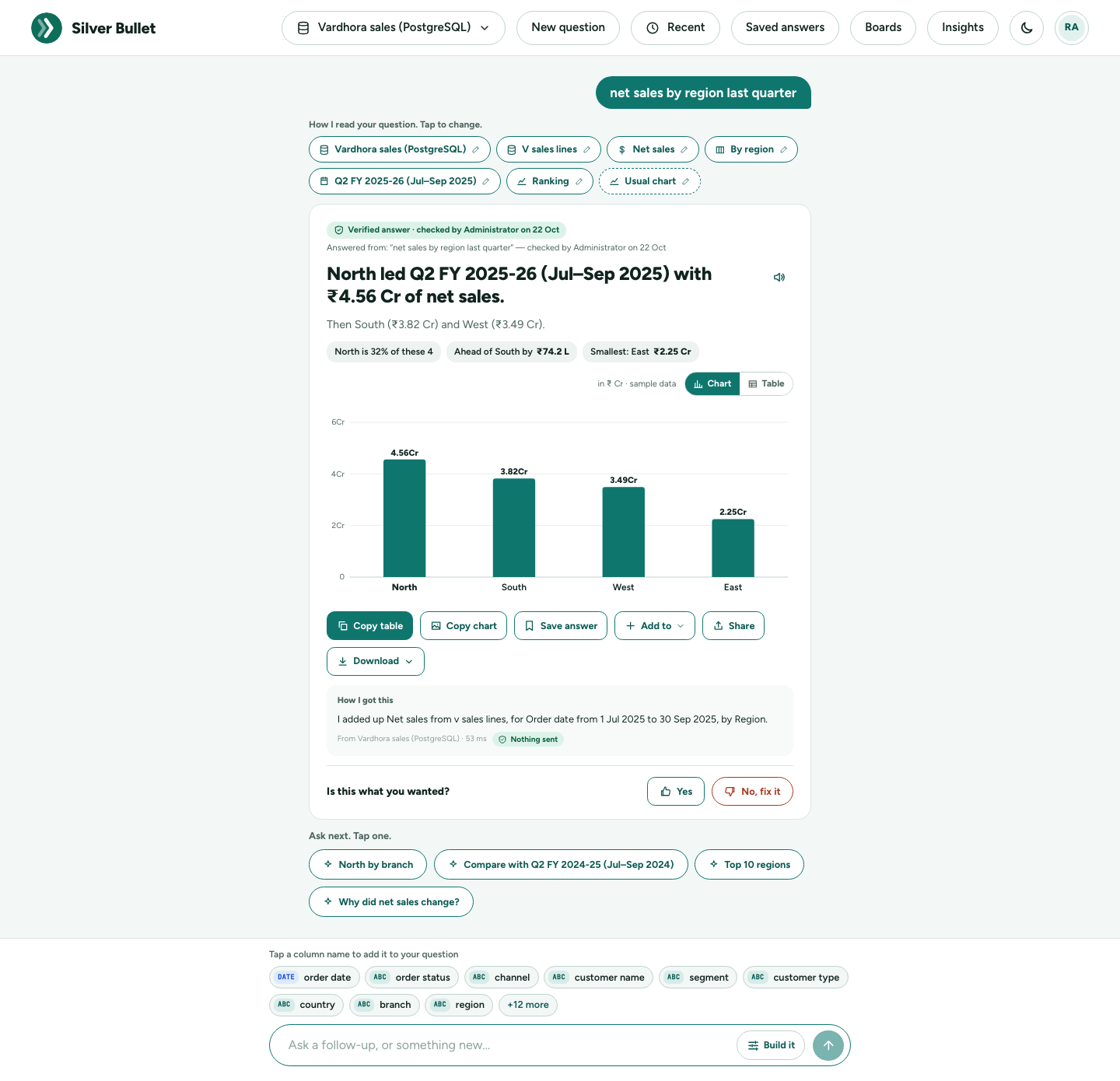
A verified answer shows Verified answer · checked by you on 3 Oct. When it came from a differently worded question, the card also says Answered from: “…” — checked by you on 3 Oct. Periods such as “last quarter” are read again for today each time.
Remove verified on such an answer stops using it: No longer a verified answer. The question is read as usual from now on. It is kept in the history.
Brief and schedules
The home page’s Your brief and every board tile are worked out in advance, so opening the home page or a board never queries a database.
When they are worked out, per source:
| Source | When |
|---|---|
| A database | On its schedule: Every day at a time (06:00 by default, this computer’s time), Every hour, or Not refreshed. Also once after its first successful test. |
| A file | When a new or replaced file (or added rows) is loaded. Never on a timer. |
| Any source | At once when its dictionary is published or a correction with a rule is made a verified answer. |
A schedule runs only while Silver Bullet is running. Change a database’s schedule under Health and logs → Data sources, in the Brief and boards refresh column, and press Save. A file source shows Refreshes when the file is replaced there instead: it has no schedule to change.
On a board, Refresh now works out its tiles again at once. On the home page, Refresh now beside Your brief works out the brief, and the board tiles of the same sources, again at once: for the source picked in the data picker, or every healthy, switched-on source for All my data. A failed refresh keeps the last figures and says why (The brief could not be worked out again: …).
The brief uses the dictionary’s main measure, grouping and date, the period being the last complete financial-year quarter (April–March year), compared with the quarter before. Your rules apply (“leave out cancelled orders”). Mark the main measure in the dictionary for a good brief. A file whose data ended in the past (a 2022 export) is reported on its own last quarter; when the data does not cover the quarter before (three months of orders), the brief is its last month against the month before, and the home cards compare only with periods the data covers.
AI model
Admin → AI model chooses Where the AI model runs.
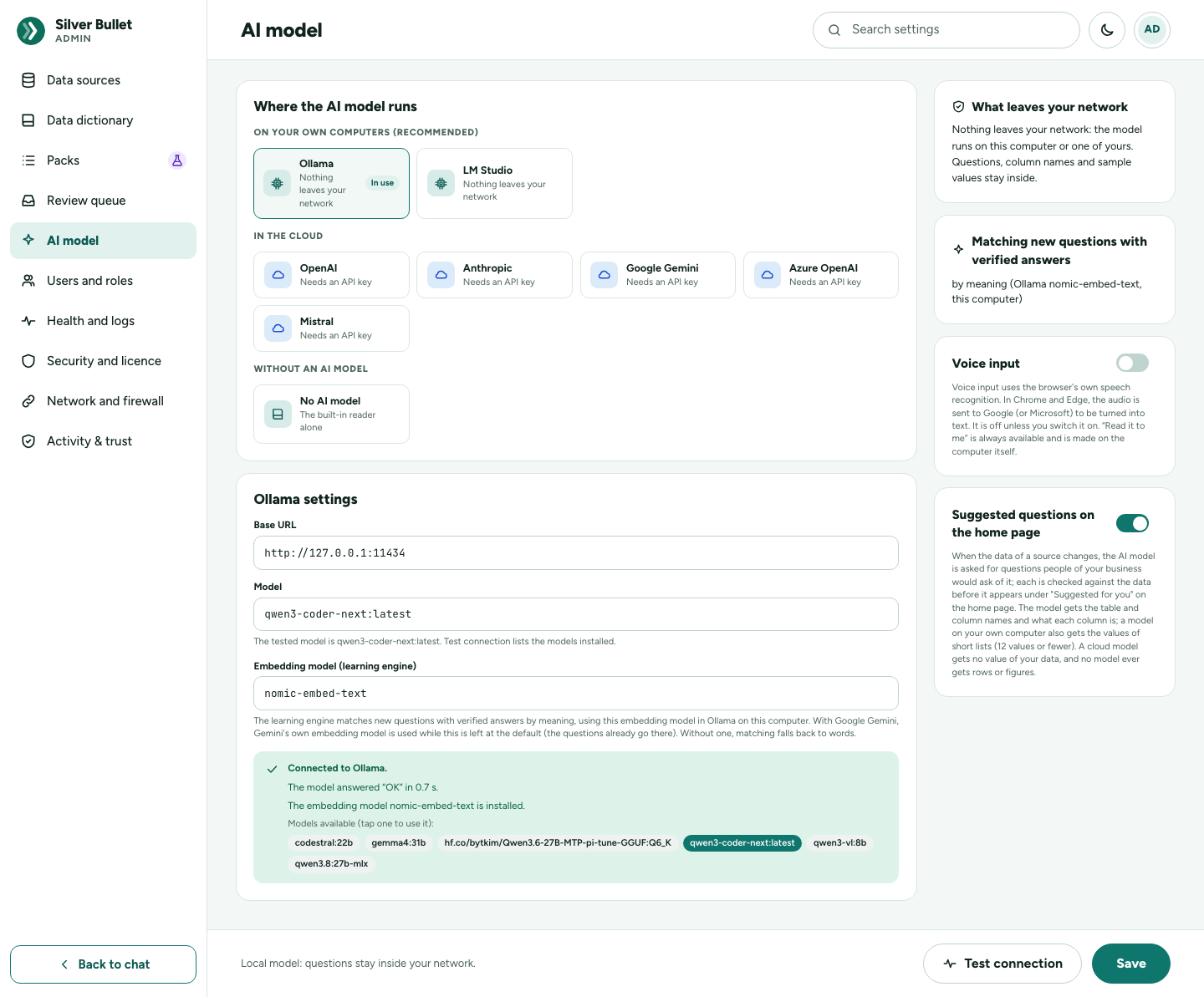
- On your own computer (recommended): Ollama (the default, at
http://127.0.0.1:11434, modelqwen3-coder-next:latest) or LM Studio. Nothing leaves your network. - In the cloud: OpenAI, Anthropic, Google Gemini, Azure OpenAI, Mistral. Each needs an API key. Read What leaves your network before saving: with a cloud model, your question and the names of your tables and columns (with their meanings and your rules) are sent to the provider; never your data. A value from your data is sent only when you typed it in the question yourself. Rows, answers and results are never sent.
Whichever model you choose, it never receives your rows or query results. Most tapped and simply worded questions are read without the model at all.
API keys are sealed on this computer; they are never shown again and never written to the log. A stored key shows only a short preview; leave the field blank to keep it, or Remove the stored key. OpenAI, Anthropic, Google Gemini and Mistral are always reached at their fixed public address; Azure OpenAI at your resource’s URL. A key is only ever sent to the address it was typed for: after you change Azure’s URL, type the key again. After an upgrade from a 3.0.0 test release, a key stored for a provider that was not in use is removed: type it again when you choose that provider.
Test connection checks the settings: The model answered “OK” in 0.1 s, lists the models available (tap one to use it), and says whether the embedding model is installed. Save applies the model to new questions.
Embedding model (learning engine), nomic-embed-text by default, lets
Silver Bullet match a new question to a verified answer by meaning. Install it
with ollama pull nomic-embed-text. Without it, questions are matched by
words, which matches fewer paraphrases. Which embedding model is used:
| AI model | Embedding model, while the field is left at the default | Named in the field |
|---|---|---|
| Ollama, LM Studio | nomic-embed-text in that server |
that model in that server |
| Google Gemini | Gemini’s own gemini-embedding-001 (the questions already go to Google) |
that Gemini model |
| OpenAI, Mistral | nomic-embed-text in the local Ollama: their own models (text-embedding-3-small, mistral-embed) are not measured yet, so they are used only when you type them |
that model at the provider |
| Azure OpenAI | nomic-embed-text in the local Ollama (Azure has no fixed model names) |
your embedding deployment’s name |
| Anthropic | nomic-embed-text in the local Ollama (Anthropic has no embeddings) |
that model in the local Ollama |
| No AI model | none: matched by words | (none) |
Measured on 16 Test Kit questions and 39 ways of saying them again
(different words, the same specifics): Gemini’s gemini-embedding-001 matched
39 of 39, nomic-embed-text 37, words 29, and none matched a different
question. Each model has its own threshold (0.87 for Gemini’s, 0.85 for
nomic-embed-text): their similarities are on different scales. Vectors of two
models are never compared; after a change of provider, each verified answer is
embedded again by the new model the first time it is matched.
The page says how matching works now, under Matching new questions with verified answers (and Admin → Health says it too): by meaning (Google Gemini gemini-embedding-001), by meaning (Ollama nomic-embed-text, this computer), by words: no AI model is chosen, or by words for now: the embedding model (…) is not answering (since 10 Oct 10:42). When the embedding model stops answering, questions are matched by words and it is tried again every five minutes; the log has one warning when it stops and one line when it answers again.
The providers and what each needs:
| Provider | Where the model runs | The question and data descriptions | Fields on the AI model page |
|---|---|---|---|
| Ollama | your computer or network (port 11434) | stays on your network | Base URL, Model |
| LM Studio | your computer or network (port 1234) | stays on your network | Base URL, Model (optional) |
| OpenAI | cloud | leaves your network | Model, API key |
| Anthropic | cloud | leaves your network | Model, API key |
| Google Gemini | cloud | leaves your network | Model, API key |
| Azure OpenAI | your Azure tenant | leaves your network | Resource URL, Deployment name, API version (optional), API key |
| Mistral | cloud | leaves your network | Model, API key |
What was measured:
| Model | Data | Right answers | Measured | Memory |
|---|---|---|---|---|
qwen3-coder-next |
Sample database on PostgreSQL 18 | run 1: 39 of 41 (95%); run 2: 39 of 41 (95%) | Test Kit (Indian distributor, INR and USD), every question typed, two runs, 4 October 2026 | about 64 GB |
qwen3-coder-next |
Sample database on MySQL 9.7 | run 1: 38 of 41 (93%); run 2: 38 of 41 (93%) | Test Kit (Indian distributor, INR and USD), every question typed, two runs, 4 October 2026 | about 64 GB |
qwen3-coder-next |
Sample database on MySQL 8.4 | run 1: 40 of 41 (98%); run 2: 40 of 41 (98%) | Test Kit (Indian distributor, INR and USD), every question typed, two runs, 4 October 2026 | about 64 GB |
qwen3-coder-next |
Sample database on SQL Server 2022 | run 1: 38 of 41 (93%); run 2: 38 of 41 (93%) | Test Kit (Indian distributor, INR and USD), every question typed, two runs, 4 October 2026 | about 64 GB |
qwen3-coder-next |
Sample database on Oracle 26ai | run 1: 38 of 41 (93%); run 2: 38 of 41 (93%) | Test Kit (Indian distributor, INR and USD), every question typed, two runs, 4 October 2026 | about 64 GB |
qwen3-coder-next |
The four sample files | run 1: 26 of 29 (90%); run 2: 26 of 29 (90%) | Test Kit (Indian distributor, INR and USD), every question typed, two runs, 4 October 2026 | about 64 GB |
gemini-3.5-flash-lite (Google Gemini, cloud) |
Sample database on PostgreSQL 18 | 40 of 41 (98%) | Test Kit (Indian distributor, INR and USD), every question typed, one run, 21 October 2026; sent only the question’s own values | an ordinary computer |
gemini-3.5-flash-lite (Google Gemini, cloud) |
Sample database on MySQL 9.7 | 40 of 41 (98%) | Test Kit (Indian distributor, INR and USD), every question typed, one run, 21 October 2026; sent only the question’s own values | an ordinary computer |
gemini-3.5-flash-lite (Google Gemini, cloud) |
Sample database on MySQL 8.4 | 39 of 41 (95%) | Test Kit (Indian distributor, INR and USD), every question typed, one run, 21 October 2026; sent only the question’s own values | an ordinary computer |
gemini-3.5-flash-lite (Google Gemini, cloud) |
Sample database on SQL Server 2022 | 40 of 41 (98%) | Test Kit (Indian distributor, INR and USD), every question typed, one run, 21 October 2026; sent only the question’s own values | an ordinary computer |
gemini-3.5-flash-lite (Google Gemini, cloud) |
Sample database on Oracle 26ai | 41 of 41 (100%) | Test Kit (Indian distributor, INR and USD), every question typed, one run, 21 October 2026; sent only the question’s own values | an ordinary computer |
gemini-3.5-flash-lite (Google Gemini, cloud) |
The four sample files | 27 of 29 (93%) | Test Kit (Indian distributor, INR and USD), every question typed, one run, 21 October 2026; sent only the question’s own values | an ordinary computer |
codestral:22b |
Live databases (Suite 2’s engine) | 87.8–92.7% correct; about 1 in 10 silently wrong | 41 questions on four database engines, September 2026, with Suite 2 (not yet measured with Suite 3) | 16 GB |
Until an administrator saves another model on the AI model page, Silver Bullet uses Ollama at SB_OLLAMA_URL (default http://127.0.0.1:11434) with SB_MODEL (default qwen3-coder-next:latest), and SB_EMBED_MODEL (default nomic-embed-text) to match questions to verified answers by meaning.
The same model can read the same question differently from one run to the next, and a change to what it is told (the dictionary, the rules, a new release) can change its readings of other questions. The Release Notes list every wrong answer.
Approvals reach the model only as examples for nearly the same questions, and the safety check of a correction also asks the model before the fix is published: in the Test Kit’s learning loop (five databases and the files, twice), nine wrong answers were corrected and no right answer became wrong.
Models of about 7 billion parameters are wrong far more often, with nothing to show it. Use a code model of 20 billion parameters or more.
Of the cloud models, Google Gemini (gemini-3.5-flash-lite) was measured, sent only the question’s own values: 200 of 205 database answers and 27 of 29 file answers right. A value the question names only by its meaning (“exports” for the value “96-Foreign Country”) cannot be matched by a cloud model; such an answer is marked Please check, and one correction with No, fix it teaches it. The other cloud providers have not been measured with this version.
Measure the model on your own data before relying on it: the Test Kit shows how.
Only the local model qwen3-coder-next was measured for this release. Cloud
models are supported but not yet measured. Before you settle on a model, try
it on your own data: ask the questions you usually ask, and check the answers
against figures you know. The Test Kit shows how.
Voice input is also on this page. It is off by default. Switched on, a microphone appears in the chat; it uses the browser’s own speech recognition, and in Chrome and Edge the audio is sent to Google to be turned into text. “Read it to me” always works and is made on the computer itself.
No AI model
Without an AI model → No AI model is a choice like the providers: no model is ever called, and nothing is sent anywhere. Silver Bullet answers the questions its built-in reader reads by itself (the home page’s cards and questions said like them, net sales by region last quarter) and the verified answers it matches by words. A question it cannot read gets a note, not an error: You have chosen not to use an AI model, so Silver Bullet answers the questions it can read by itself. Try a card on the home page, or say it like “…”, with questions it can read to tap (SB3-4004). The AI suggestions on the home page are off (there is no model to ask), the safety check of a correction runs the replay without a model check (it says why), and describing columns with AI in the data dictionary is not available. The other settings on the page are kept: choose a provider again to use it.
Without an AI model, Silver Bullet answered 10 of 205 Test Kit questions on
five databases and 1 of 29 on files by itself, all of them requests to change
data, refused as they should be. The Test Kit’s questions are written the way
an analyst would ask them ("…excluding cancelled orders? Use the region of the
branch that fulfilled the order."), and the built-in reader reads none of them
whole: with a model, Gemini answered 199 of 205 and the local
qwen3-coder-next 189 of 205. Choose No AI model if you mostly tap the cards
and ask short questions; choose a model if you type questions like these.
When the AI model cannot be reached
A fresh installation uses Ollama on this computer. When the chosen model
cannot be used (Ollama is not running or not installed, the model is not
pulled, a cloud provider has no API key) the AI model page and your home page
say so before you ask, with three ways out: Set up a cloud model,
Install Ollama on this computer (then ollama pull qwen3-coder-next), or
Use no AI model. Silver Bullet checks when it starts and when these pages
are opened (Ollama’s model list, at most once a minute; a cloud provider is
asked only by Test connection), and the log has one warning when the model
stops being usable and one line when it is usable again. Admin → Health
shows the AI model’s state as well.
Activity & trust
Activity & trust (the account menu, or Admin → Activity & trust) records every question you ask and every request sent to an AI model. It has four tabs:
- My activity: your question log, filtered by how each was answered and when. Open one for its trail: what was sent beside what was kept, each request’s exact text and the reply.
- Overview: over 7 to 365 days, how many questions needed an AI model, what the requests carried, where they went, the questions asked often, not verified yet (Verify asks it again, so you can mark the answer verified), those not answered most often, and the Network: every address the program talks to. Download signed report is the zip of that period.
- Flags: a phone number, e-mail address, PAN, Aadhaar number, GSTIN or card number you typed into a question that went to an AI model, masked. They are a reminder to ask by other means (by a customer’s number, or pick it with a filter chip); Mark coached clears one. Reveal shows the value.
- Records and backups: whether the record is intact (each entry is
chained to the one before; one changed or removed outside the program
shows), Download a zip for any period, Check a zip, the backups,
and Keep and back up: questions are kept a year and the exact text of
requests 90 days by default, with a zip made before anything is removed,
and a zip of each month on the 1st (in the data folder’s
activity-backups). Keep the zips removes them after 12 months by default (they hold request text past its own 90 days); choose longer, or Until removed by hand.
What is recorded and what the AI model receives is described in full in the Security and Privacy Guide.
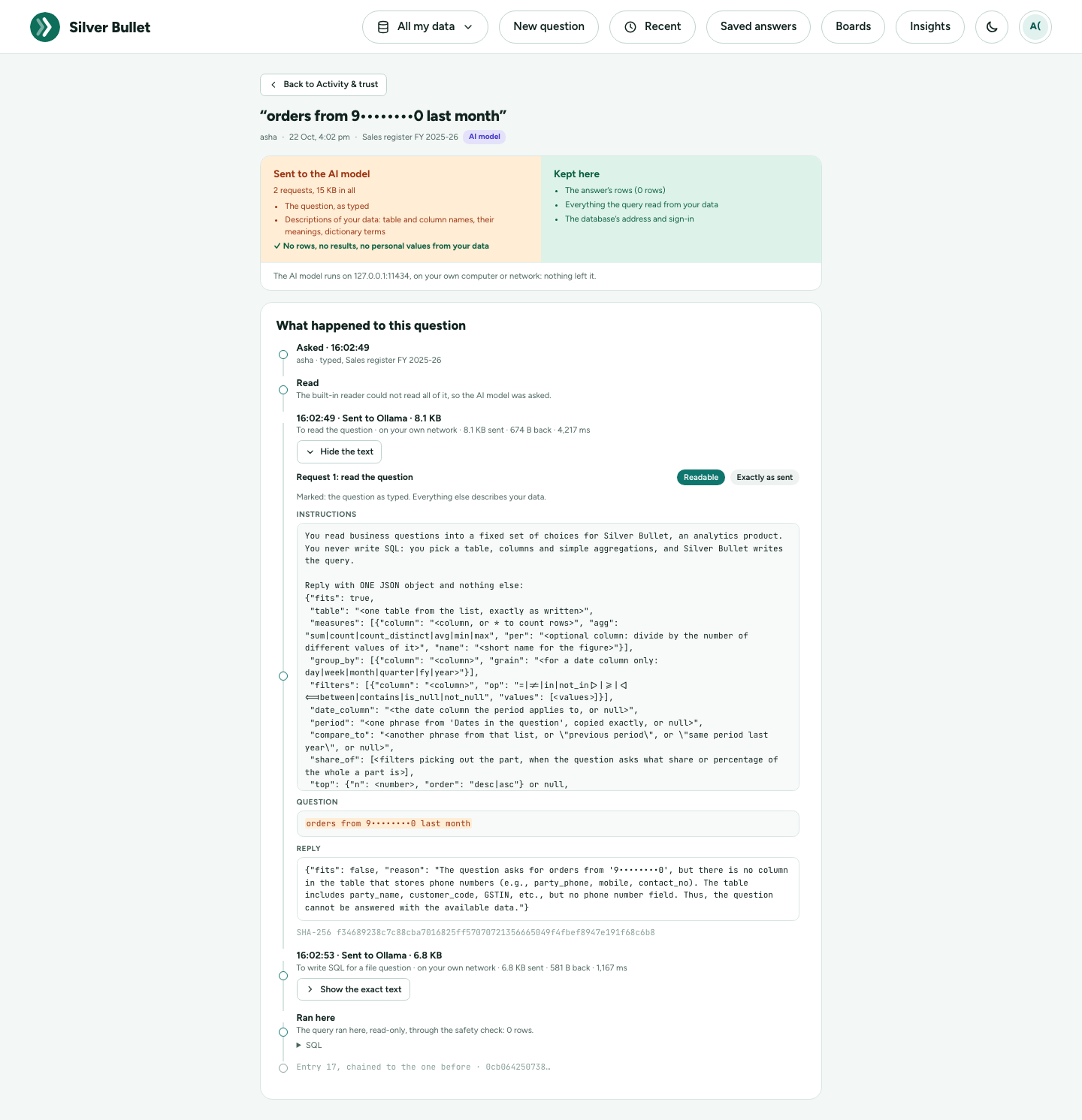
Network and firewall
Admin → Network and firewall lists every connection Silver Bullet makes, worked out from its own settings, data sources and AI model: which databases, sign-in services (Microsoft Entra ID, Kerberos), AI model and other services it must reach, the host names a web proxy must allow, and what is never needed (no licence server, update check or telemetry). Nothing needs to reach Silver Bullet from the network: it answers on this computer only (127.0.0.1), so no inbound rule is needed. Check from here tries each outbound connection and says, row by row, whether it answered and if not why; Download CSV and Copy as text give the request to send to your network team. Add a data source or change the AI model, and the page follows.
Health and logs
Admin → Health and logs. It has two pages: Health (below) and Logs (the recent errors).
-
Problems comes first: each thing wrong, in plain words, with a button that fixes it, or Nothing needs your attention.
Problem The button The AI model is not answering, needs its API key, is not installed, or its setting is not valid Set up the model (Admin → AI model) A data source stopped working (the reason is shown) Check the connection (the source’s form, with Test connection) Little room left on the computer (under 2 GB, or 5 %) Free space: removes all but the two newest backups, after you confirm, and says how much room it made The last backup failed, or none for twice the backup interval Back up now The trial or the licence ends within 3 or 14 days, or has ended; the computer’s clock is behind Open the licence -
Packs (Admin → Packs, administrators): the region in use (with Change); Apply packs by themselves (on: a source that clearly fits an industry gets its pack after its first test; off: none does, and each source’s Data dictionary still offers Add); and each industry pack with a Use this pack switch and the data sources it is used on. Switching a pack off puts the measures it added aside (answers stop using them; measures you changed yourself are kept) and marks its sources’ cards Paused; switching it on brings them back. Column meanings and privacy marks stay either way.
-
Industry packs (Data dictionary, above the measures): a source that is clearly a loan book gets the Banking and lending (BFSI) pack after its first test: its standard measures (GNPA %, 30+ DPD %, provision coverage…), the meanings of the columns it recognised, and the loan account marked as personal. The card lists what was added and what was not, and why (for example: loans appear on several rows, so balances are not added); Undo takes it back, except what you changed since. A source that only partly fits is offered the pack: Add or No thanks. A policy register, claims register or insurance portfolio summary gets the Insurance (BFSI) pack the same way (loss ratio, combined ratio, claim settlement ratio…), and a production, downtime, maintenance, dispatch or batch record the Manufacturing pack (rejection rate, first pass yield, availability, on-time delivery, batch yield…), and a hospital’s admissions, ward census, out-patient visits or claims the Healthcare pack (length of stay, bed occupancy, ARPOB, readmission rate…), which marks patient ID, name, date of birth, phone, address and diagnosis as personal. Store bills, store summaries, stock or a distributor’s receivables get the Retail and distribution pack (average bill value, gross margin %, sales per sq ft, sell-through, overdue receivables…); a plain invoice table is left as it is. A fee ledger, attendance register, results sheet or campus summary gets the Education pack (fee collection %, attendance %, pass rate…), which marks student IDs, names, dates of birth and parents’ phones as personal. A figure a pack knows but does not work out (OEE, roll rates, persistency) is answered with the reason, not guessed.
-
Region and formats: how money, dates and the financial year are written (for example Formats for India: ₹12,34,567.89 · 21/10/2026 · financial year from April). Change lists India, United States, United Kingdom, Europe (euro), Canada, Australia and International (English), each with its examples; the new formats apply at once. Your data is not changed. A new installation picks its region from the computer’s time zone and language.
-
This Silver Bullet: version, edition, how long it has been running, its address, the data folder, log folder and settings file, the system, the largest upload, the AI model (in use and answering, No AI model, or what is wrong with it, since when) and how Verified answers are matched (by meaning, with which embedding model, or by words and why). Download environment report gives the report support asks for: Silver Bullet, the computer, the licence, the AI model, every source’s status and server version, and disk use, never passwords, keys, database hosts, logins or driver parameters.
-
Data sources: each source’s status, when it was last checked, the last connection test (passed or failed, with the reason), and its Brief and boards refresh schedule: for a database Every day at a time, Every hour or Not refreshed (then only Refresh now works it out). A source loaded from a file has no schedule: it says Refreshes when the file is replaced.
-
The log (the Logs page): the newest lines of the log (errors, warnings or everything), with the reference shown on screen with an error. How much to show: Errors, Warnings, Everything. Search these lines keeps only the lines with every word typed (3 of 300). The lines fill the window and scroll inside it; the page itself stays put. Passwords and keys are never in the log.
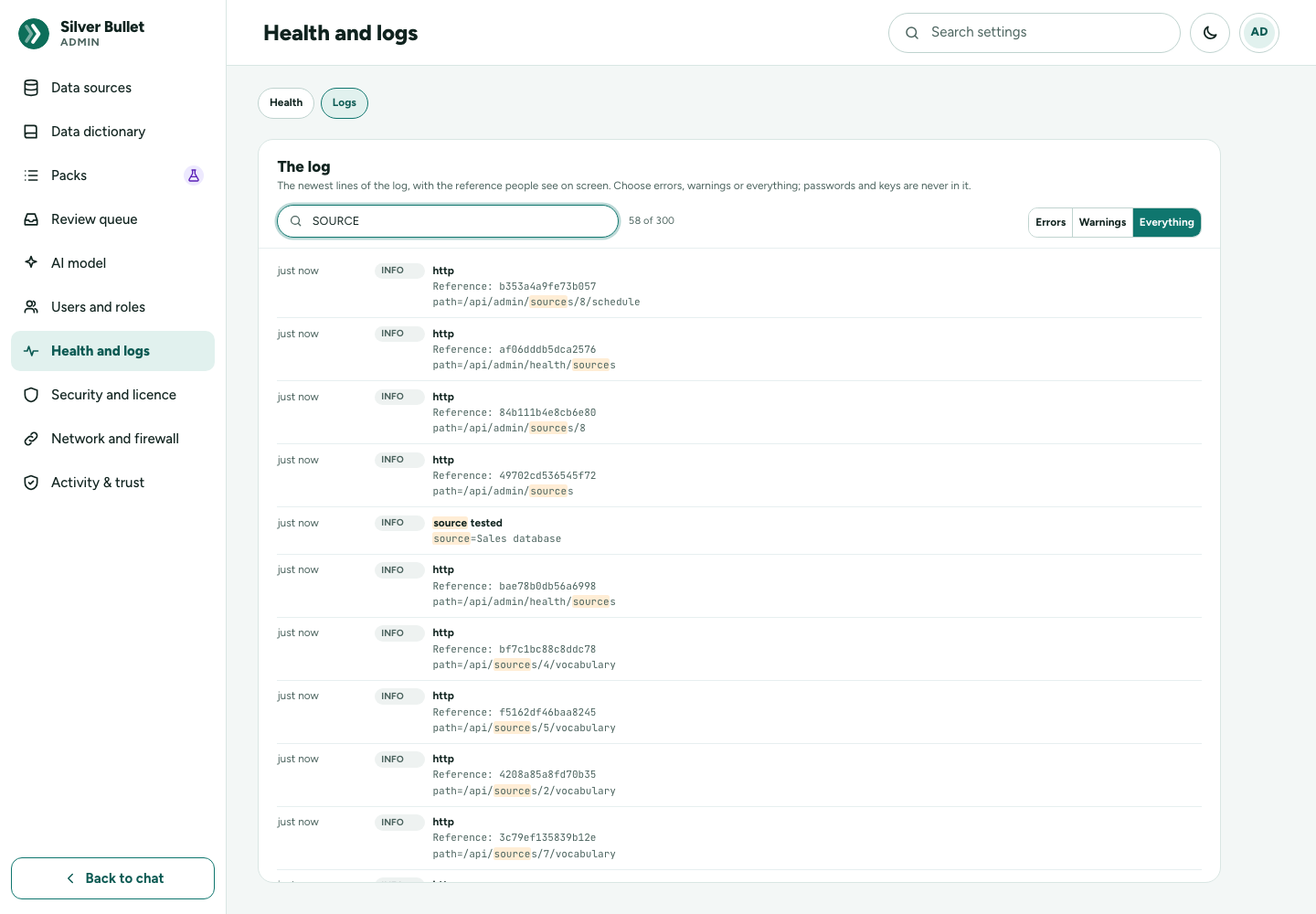
-
Backups: how often Silver Bullet backs itself up and how many are kept, the last backup and the next, and Back up now (see Backups).
-
Send to support: one file for support, with what it holds listed before you save it: the log files (passwords, keys and share links removed), the record of the last 30 days’ changes and the environment report; never your data, files, answers, passwords or keys. Type a Case reference if support gave you one, press Save the file, then Open the support page or E-mail support (subject filled in) to send it.
-
Where Silver Bullet runs: the computers, browsers and AI models this version was built for and measured with: the same tables as the Installation Guide and the Test Kit guide (the databases’ tested versions are on each card under Data sources).
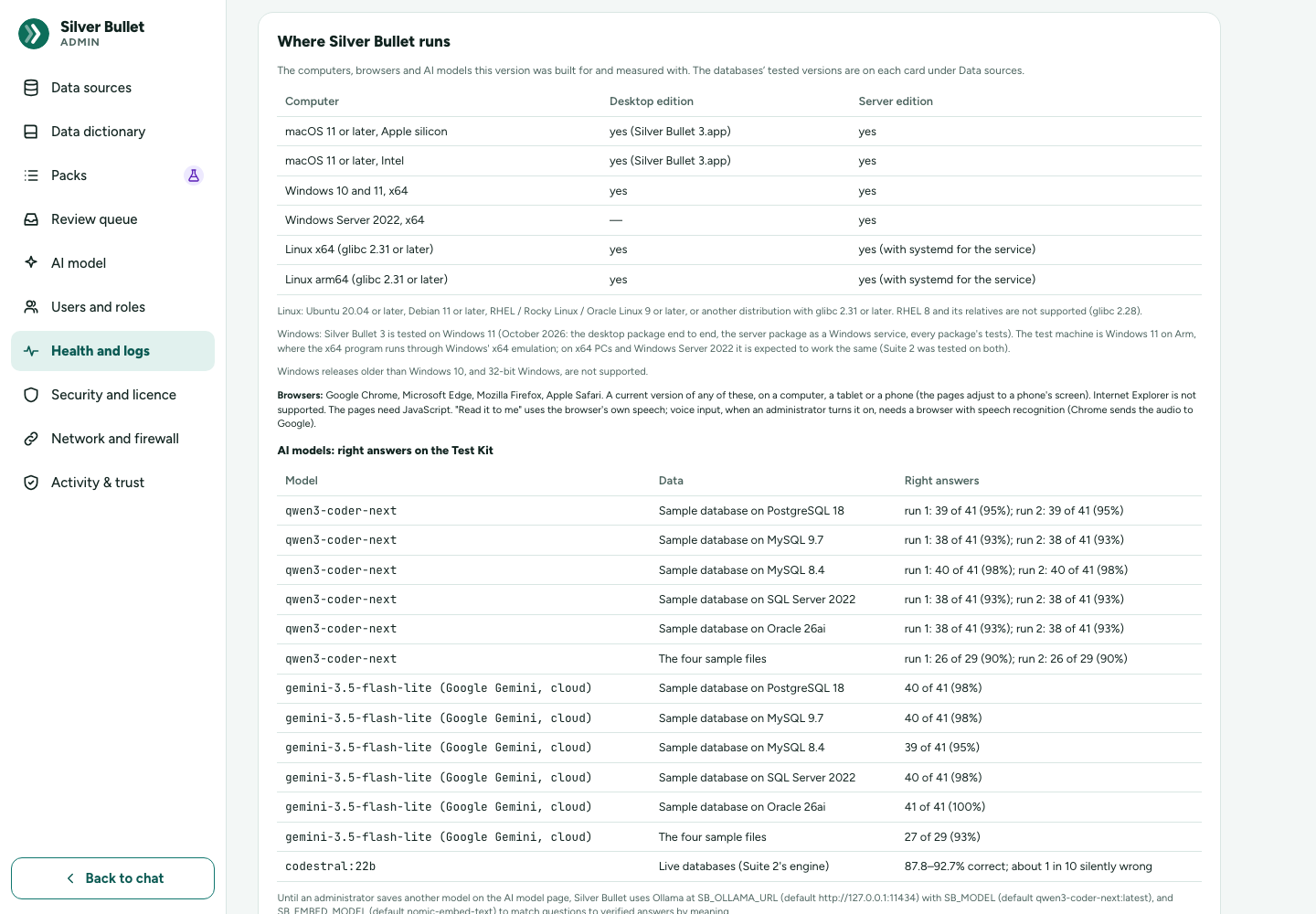
The log itself is logs/silverbullet.jsonl in the data folder.
Components and vulnerabilities
Silver Bullet is built from many third-party components: Go modules, the web interface’s packages, the DuckDB engine and the libraries it carries, SQLite, fonts. Every release lists them (its software bill of materials, SBOM) and the known vulnerabilities in them as of the day it was built. Both are inside the program, so you can read them without the internet, in Admin → Components. Admin → Health shows a one-line summary with a link.
Reading the page
- The verdict, first: one line with a status. Green: no known vulnerability affects this version. Amber: none can be fixed now, and some wait for a fix from their maintainer (it names whom, such as DuckDB). Red: some affect it and a fix is available (a patch release will carry it).
- The findings by group, each with the reason in plain words: Affects you, Waiting for a fix, and Not affected (including those fixed in this release; there the severity is a small grey label).
- Details for your security team, closed until you open it: the counts, the full table and the downloads below.
- The counts: the known vulnerabilities by severity (Critical, High, Medium, Low, and Not rated when the source gave no rating; no rating is ever made up), how many are open, and how many have no patch from their maintainer.
- Known vulnerabilities, one row each:
- Severity: the source’s CVSS score and level (NVD, GitHub Advisory Database), or Not rated.
- Reachable: Yes when the check of the built program found the vulnerable code in it, No when it found it is not (for example, a package that is not linked in), Not determined where no check can tell (web packages, C/C++ libraries).
- Patch available: Yes with the fixed version, or NO PATCH FROM THE MAINTAINER (as of the date of the check**)**.
- Our status: Fixed in this release; Not affected (with the reason); Accepted (our decision, with the reason); Waiting for upstream (no fix exists yet); Fix available, not applied (a later patch release will carry it).
- Components (SBOM): every component with its version, kind (Go module, web package, C/C++ library, runtime, font or data), licence and supplier; a library carried inside another says so (inside DuckDB). The search box filters both lists.
- Download (in the details): the SBOM as CycloneDX (the
release’s own file, the same bytes as in the release’s checksum list) or
SPDX, and the report as JSON or text (
VULNERABILITIES.md, which opens with the same verdict and groups), for your own security tools or an audit.
A development build (not a release) lists only its Go modules and says vulnerability data: not checked for development builds.
Loading an advisory
Vulnerabilities keep being found after a release is built, and Silver
Bullet does not go to the internet to look for them. When Govirang
Microspaces Private Limited learns of new ones, it publishes a signed
advisory (a .zip). Load the newest one with Load an advisory on the
Components page: its signature is checked with the release key built into
Silver Bullet. An advisory that was changed, is not ours or is for another
product is refused (SB3-5020) and the one loaded before is kept. Only
the newest advisory is kept; an older one is refused.
The page then lists the advisory’s findings and says, for each, whether it affects this installation (this version has the component at an affected version) and which patch to apply (Apply patch 3.0.1-patch.1 with the package’s name), or that there is no patch for it yet.
Installing a patch release
A component patch release is a release rebuilt with only some
third-party components updated (for example DuckDB 1.5.5 → 1.5.6 to fix a
vulnerability) and nothing else changed. Its version is the release’s with
-patch.N (3.0.1-patch.1; for a release candidate 3.0.0-rc.7.patch.1): newer
than the release it patches, older than the next release. Install it like
any new version: quit Silver Bullet and replace it with the new one (see the
Installation Guide); your data is kept. After it,
the Components page lists the new versions and the fixed findings as Fixed
in this release.
Licence
Admin → Licence shows the state of your licence.
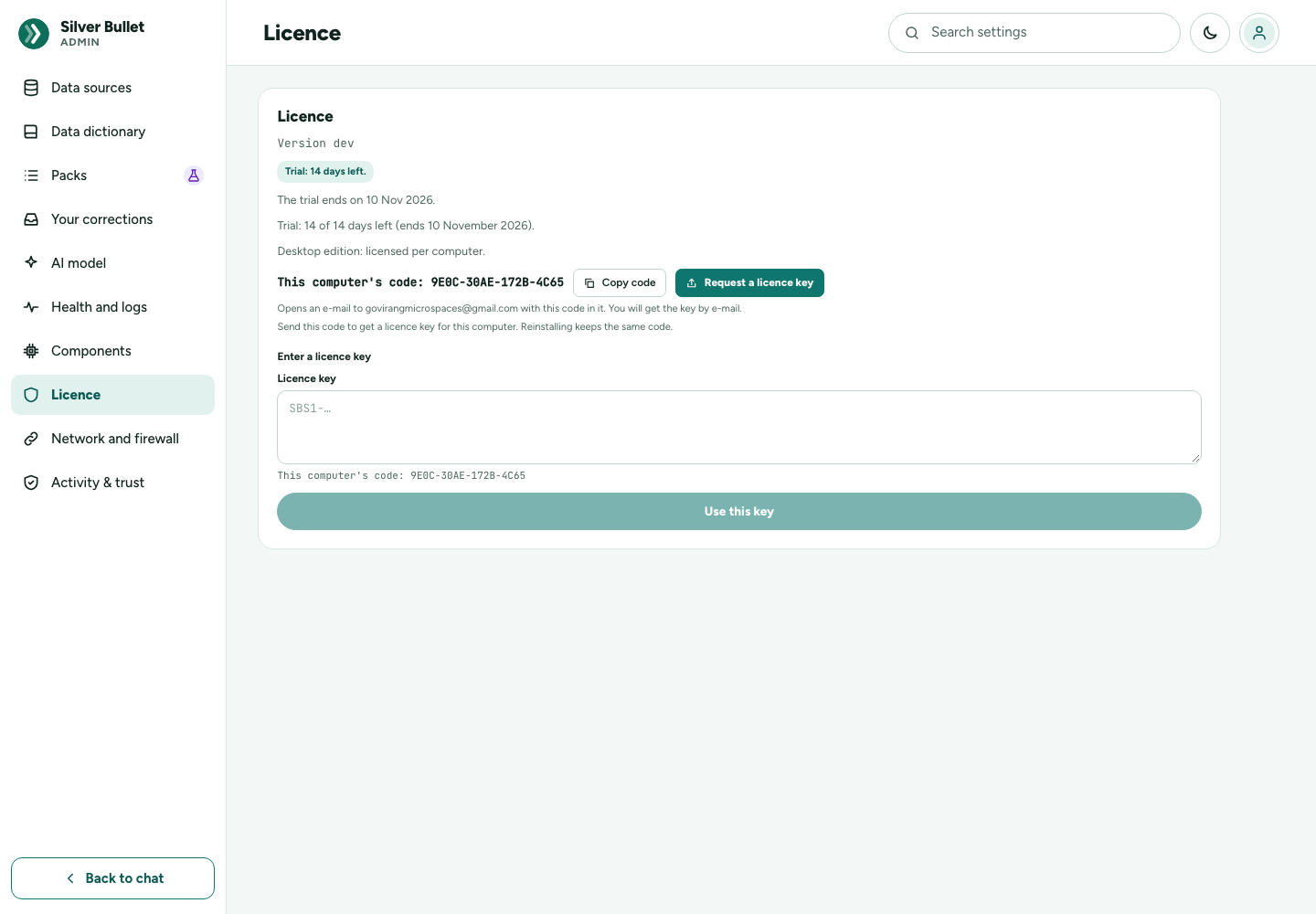
Silver Bullet runs a 14-day trial from its first start, then needs a licence key. One licence includes every plugin. A licence is per computer: the key works on the computer whose code it was issued for. Nothing is contacted over the network to check a licence.
The page shows:
- Trial: N days left. and The trial ends on …, or Licensed to your organisation (and until when);
- Desktop edition: licensed per computer.;
- This computer’s code (
AB12-CD34-EF56-7890) with a Copy code button; - Enter a licence key, with Use this key.
Buying a licence. Silver Bullet is bought from inside the app; there is no account to make.
- On Admin → Licence (or the trial’s banner, or Licence needed), press Buy a licence.
- Choose Monthly (a subscription) or Yearly (one payment, two months free). The price is that of the region Silver Bullet guessed from your computer: India ₹250 + GST a month; the Americas, the Middle East and North Africa and the rest of the world US$7 + tax; Europe €8 + tax; the United Kingdom £8 + tax; Singapore S$10 + tax; Australia A$10 + tax. Change Price for if you pay from elsewhere: an India, Europe, UK, Singapore or Australia price paid with a billing address outside that region is held for checking before the key is sent.
- The window shows the computer the licence is for, and No refunds once the key is delivered — use the free trial to try Silver Bullet first. Outside India, tick I am buying for business use (no tax number is needed). The links open the terms of sale, the licence agreement and the privacy notice.
- Go to checkout opens Dodo Payments’ checkout in your browser (or scan the QR code to pay from your phone). Dodo takes the payment, adds the tax and sends the invoice.
- After paying you come to a thank-you page that shows the key once, and the key is e-mailed to you. Meanwhile the Licence page says Waiting for your payment…; with Let Silver Bullet fetch my key ticked (the default), the key is installed by itself within a minute: Licensed until …. Otherwise paste the key from the e-mail under Enter a licence key.
Monthly subscriptions. Each month’s key is fetched by Silver Bullet itself (and e-mailed). It is valid to the end of the paid month plus at least 7 days, so a card that fails on a weekend locks nobody out. While a subscription key is installed, the Licence page shows Manage subscription instead of Buy: Dodo’s page, where you cancel, change the card or download invoices. If a payment fails, a banner says Your last payment did not go through with Update payment method.
Already bought? On the Licence page:
- Get my key — the order number (in the e-mail with your key, or on the receipt) and the e-mail you paid with. The key for this computer is installed at once: after a lost key, a reinstall, a deleted data folder.
- Move to this computer — for a licence bought for another computer, or after reinstalling Windows or Linux (which gives the computer a new code). Enter the order number and e-mail; open the link e-mailed to the order’s address within 30 minutes and press Confirm; the key then arrives here by itself. A monthly licence moves once every 30 days, a yearly one twice a year; for more, e-mail the licence address. The old computer’s key stops working 7 days after the move, once that computer has been online (it checks once a day).
Fetching keys. Two switches on the Licence page: Fetch my key after Buy and Fetch each month’s key by itself, both on. A key bought online is also checked with the licensing service once a day (soon after each start) and when it is entered, switch or not: that is how a licence moved to another computer stops here. Offline, nothing changes. Below the switches, What we send: this computer’s code, the claim made at Buy, the key in use, and the order number and e-mail only when typed — never anything about your data. See Security and Privacy.
A key by e-mail or by hand. A key (SBS1-… signed by hand, or
SBS2-… bought online) can always be pasted under Enter a licence key
and Use this key: it takes effect at once, with no connection. A key
that does not fit (copied in part, or for another computer’s code) is
refused with the reason (SB3-6002). Until buying from inside the app is
open, Buy a licence says so and gives the e-mail address to ask for a
key with this computer’s code.
Support. Licence and payment questions by e-mail only, to the address on the Licence page; no telephone. There are no refunds once the key is delivered. If you paid and the key never came (and Get my key does not find it), e-mail your proof of payment: once the payment is verified, the key is sent to you by e-mail.
The code comes from the computer itself: reinstalling Silver Bullet or moving its data folder keeps it (and the key, in the data folder); reinstalling the system, or a new computer, gives a new code: use Move to this computer.
When the trial or licence ends, your data is kept: Silver Bullet shows Licence needed with Buy a licence, Get my key and the key field, and works again as soon as a key is installed.
Backups
Silver Bullet backs itself up: every 24 hours, while it is running, it
writes a consistent copy of everything a restore needs into the backups
folder of its data folder, and keeps the newest 7; the oldest is removed
after each new one. A laptop that was off at the usual time catches up a
couple of minutes after Silver Bullet starts.
One backup is one folder, named for when it was made
(silverbullet3-backup-20261003-060000), holding:
| File | What it is |
|---|---|
app.db |
Your data sources, the data dictionary, rules, verified answers, saved answers, boards and the record of changes. |
vault.key |
The key that seals the data source passwords and API keys stored in app.db. |
files.duckdb |
The data loaded from files (when any was loaded). |
manifest.json |
When and why it was made, the version, and what it holds: sources, datasets and their rows. |
Each file is copied consistently while you keep working: app.db with
SQLite’s own copy (VACUUM INTO), the loaded files with DuckDB’s (COPY FROM DATABASE into a new file); a copy is renamed into place only when complete,
so a half-written backup never looks like one. The temporary result area
(results/) is not backed up: it is cleared at every start.
Admin → Health and logs → Backups shows how often backups are made and how many are kept, the Last backup (when, its size, automatic or Back up now, and how many sources and rows of files it holds), the Next automatic backup, and where the folder is. Back up now makes one at once.
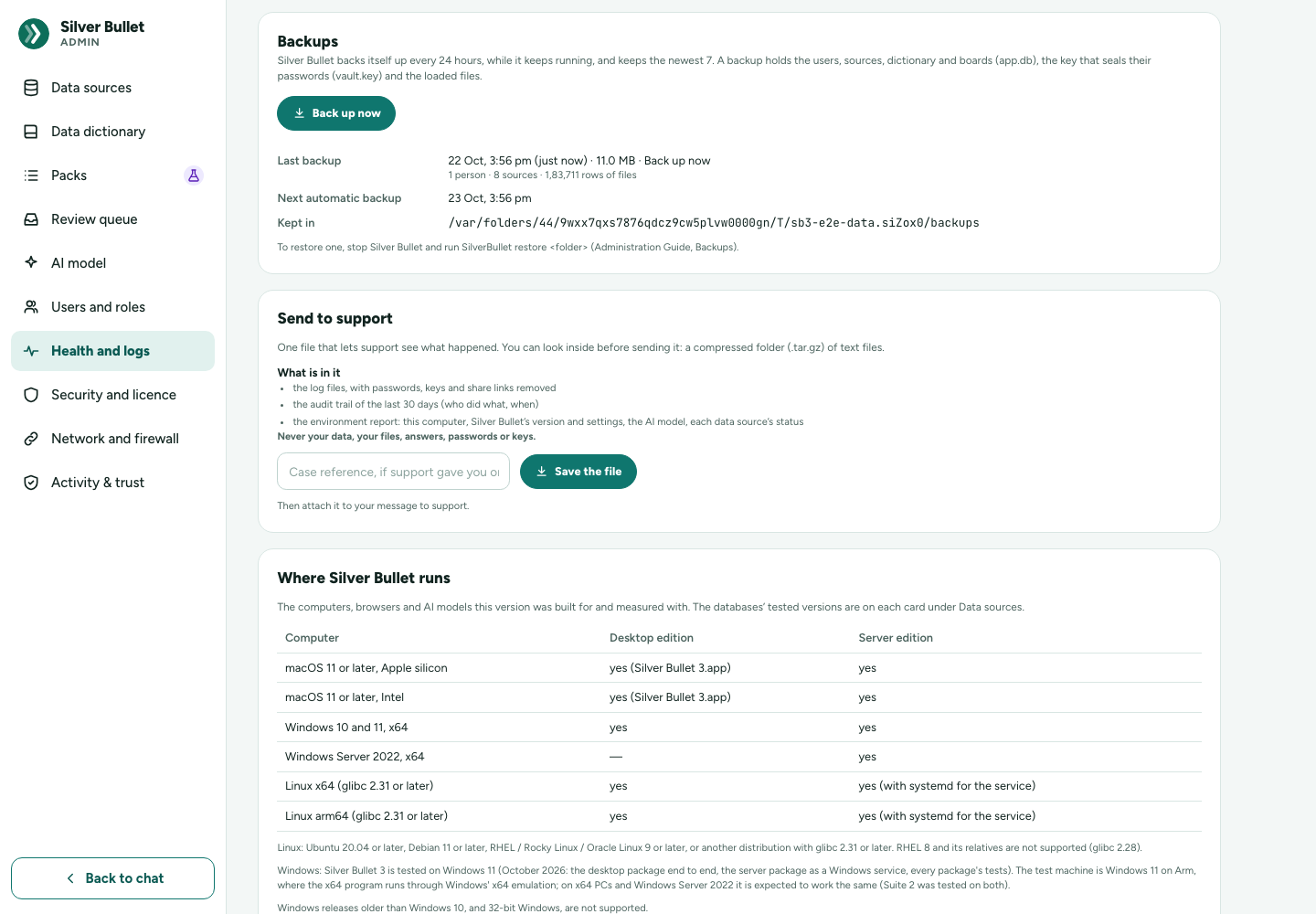
If a backup fails, the card says why (most often a full disk; error SB3-5005) and the next try is ten minutes later.
SB_BACKUP_HOURS changes how often (0 turns the automatic backup off;
Back up now still works) and SB_BACKUP_KEEP how many are kept. Put them
in a silverbullet.env file in the data folder and start Silver Bullet again
(see the Installation Guide).
Copy the backups off the computer. They sit in the data folder, on the
same disk: they help after a mistake or a damaged file, not after a lost
disk or computer. Copy the newest backup folder to other storage
regularly, with your usual backup tool or by hand. A backup holds
vault.key and app.db: anyone with both can open the stored database
passwords and API keys. Keep backups as safe as the databases they give
access to.
Restore a backup
In the app (the usual way): Admin → Health and logs → Backups lists the backups kept, newest first. Press Restore beside the one you want, tick that you understand, and press Restore. Silver Bullet:
- backs up everything as it is now (listed as Before a restore), so the restore can be undone;
- pauses for a moment, puts the data back as it was when the chosen backup was made, and starts again;
- signs your page in again by itself and shows Restored the backup of … under Backups.
Everything done after the chosen backup is taken out of Silver Bullet but kept in the Before a restore backup: to undo the restore, restore that one the same way. If the chosen backup does not open, Silver Bullet puts back what was there and says so. Each restore is in the audit trail.
With the command, when Silver Bullet will not start or the backup was copied from elsewhere:
-
Quit Silver Bullet from its menu-bar or tray icon.
-
Pick the backup: the folders in
backups/in the data folder (the name says when it was made). A backup copied elsewhere can be used from where it is. -
Run the restore command in a terminal, for example on a Mac:
"/Applications/Silver Bullet 3.app/Contents/MacOS/SilverBullet" restore silverbullet3-backup-20261003-060000On Windows and Linux, run
SilverBullet restore …from the folder you keep the program in. A full path to a backup folder works too. The command refuses while Silver Bullet is running. It does not delete anything: what the data folder held is moved tobackups/before-restore-<time>, then the backup’sapp.dbandvault.keyare copied into the data folder and itsfiles.duckdbintofiles/. -
Start Silver Bullet and check: the sources, dictionary, boards and loaded files are as they were when the backup was made; every database source passes Test connection. Everything done after the backup is gone. The
before-restore-…copy is listed under Health and logs → Backups → Before each restore (the Manager’s Backups page on a server). Once all is well you may delete it there; if you do nothing, the newest two are kept and older ones go by themselves after 30 days.
By hand, without the command (Silver Bullet quit): move app.db,
app.db-wal, app.db-shm, vault.key, and files/files.duckdb (with
files/files.duckdb.wal) out of the data folder; copy app.db and
vault.key from the backup folder into the data folder and files.duckdb
into its files/ folder; start Silver Bullet.
Always restore app.db and vault.key together, from the same backup.
A database restored without its own key cannot open the stored passwords;
Silver Bullet then refuses to start and says the vault key is missing (see
the Troubleshooting Guide).
The data folder, for copying the backups elsewhere or moving everything to another computer:
| Computer | Data folder |
|---|---|
| macOS | ~/Library/Application Support/SilverBullet3 |
| Windows | %LOCALAPPDATA%\SilverBullet3 |
| Linux | ~/.local/share/silver-bullet-3 |
(Health and logs shows where yours is.) Besides the files above it holds
licence/ (this installation’s licence), logs/ and results/. To move
Silver Bullet to another computer, quit it and copy the whole folder; the
new computer has its own code and needs a licence key of its own.
Limits
The most of each thing Silver Bullet allows, in one place. Most limits keep a page, a chart or a file readable, or stop one slow request from tying up your computer. Where a limit can be changed, the last column says how.
What has no limit
These are limited only by the free space on your computer’s disk:
- Boards, the tiles on a board, and saved answers.
- Data sources: files and databases.
- The total size of the files you load. Plan for at least 3 times the size of the files you expect to load, plus the backups (see the Installation Guide’s What you need → Hardware).
- Databases take no space at all: they are queried where they are, and nothing is copied from them.
Files
| What | The most | Change it |
|---|---|---|
| One file | 200 MB; a larger file is refused (SB3-3010) | Admin → Health and logs → Largest upload: 10 to 2,048 MB. A file is held in memory while it is checked and loaded (a 190 MB file needed about 3.7 GB for a short while), so raise it only on a computer with that much memory free. |
| Files added in one go | 10 | — Add more in a second go. |
| Uploads at once | 1 per person; a second waits until the first is done | — |
| Free disk space for an upload | twice its size; with less it is refused (SB3-3010) | Free some space |
| What a file unpacks into | its values may come to 16 times the file’s size (at least 64 MB); one Excel cell at most 32,767 characters, as in Excel. Past either it is refused as too large when unpacked. A whole number in a workbook may have at most 4,300 digits; a longer one is refused. A longer run of digits in a text cell is kept as text, not read as a number. | — Split the file, or save it again from Excel. |
| Imports waiting | 5 per person (SB3-3017) | — Continue or discard one at the top of Data sources. |
| An unfinished import | kept 24 hours after it was last touched | — |
| Time for one question about a file | 30 seconds (SB3-2003 past it) | — |
| Questions about files at once | 6, of which 3 per person; more wait. A question past its time limit no longer counts among the six, so other people are not held up. While three of a person’s are still finishing past their time limit, that person’s next ones are refused as busy (SB3-2005). Once eight questions in all are still finishing, people who have one of them wait until it ends. Questions about files use at most half the computer’s processors and half its memory. Scheduled work (brief refreshes, suggestions, the nightly check) never counts against a person. | — Narrow the question; wait a minute. |
| Fields sent with an upload | 32 fields besides the files, 256 KB in all; more is refused | — |
| One value in a CSV or text file | 128 KB; a longer one stops the read. In practice it is a stray opening quote that swallowed the rest of the file: fix the quote and upload the file again. | — |
Databases
Each database connection has its own limits, under More settings when you add or edit it (see More settings: schemas, tables and limits above):
| What | Default | Change it |
|---|---|---|
| Time for one query | 30 seconds | Per connection |
| Rows read by one query | 5,000 | Per connection |
| Queries at once | 2 (at most 16); a further one waits up to 30 seconds | Per connection |
| Full scan of a table | refused above 1,000,000 rows | Per connection (-1 turns it off) |
Chats and answers
| What | The most | Change it |
|---|---|---|
| Conversations kept | 25. When a 26th starts, the oldest (by last activity) is removed with its messages. Save an answer, or pin it to a board, to keep it for good. | — |
| Questions an hour | No limit on the desktop: you are its administrator. | — |
| Bars in one chart | 200 drawn; the rest are added up in the last bar | — |
| Slices of a pie or doughnut | 8; the rest are added up as Others | — |
| Points in a scatter or bubble chart | 1,000 | — |
| Big answers and downloads waiting to be fetched (the temporary result area) | 512 MB in all, each kept 60 minutes; the area is cleared at every start | Installation Guide: SB_RESULT_MAX_MB, SB_RESULT_TTL_MINUTES |
Boards and Studio
| What | The most | Change it |
|---|---|---|
| Pages on a board | 10 (each name at most 60 characters) | — |
| Filters on a board | 5 | — |
| Rows in a table tile | 50; the rest are left out of the tile | — |
| A board as PDF | 60 an hour (SB3-1016 past it) | — |
The Studio’s Design check also suggests at most 6 lines, 8 colours, 7 pie slices, 15 bars and 10 table rows in one tile, and a title of at most 60 characters. These are advice, not limits: a tile that breaks one is flagged, never refused.
The brief
| What | The most | Change it |
|---|---|---|
| Brief files (PDF, PowerPoint or Word) | 60 an hour (SB3-1016 past it) | — |
| A chart in a PowerPoint or Word brief | 200 categories; 500 points in a scatter or bubble chart | — |
| A table in a brief | 50 rows and 8 columns on a Word page; 12 rows and 6 columns on a slide | — |
| Figures on the cover slide | 4 | — |
The data dictionary and rules
| What | The most | Change it |
|---|---|---|
| A business measure | name 60 characters, formula 500 characters | — |
| A rule | its words 200 characters, its instruction 1,000 characters | — |
| Rules applied to one question | 8 | — |
| Suggest, I will review (the AI model drafts meanings) | 30 an hour (a cloud provider bills each one) | — |
Housekeeping
| What | The most | Change it |
|---|---|---|
| Automatic backups | one every 24 hours, the newest 7 kept | Installation Guide: SB_BACKUP_HOURS, SB_BACKUP_KEEP |
| Logs | about 60 MB (5 files of 10 MB; the oldest goes) | — |
| Network and firewall → Check from here | 30 an hour | — |
The hourly counts are kept in memory: quitting Silver Bullet starts them again.